AI Image Editing Prompts Tested: Replace, Relight, and Preserve Identity
Nine dated reference-edit outputs, exact prompts, and failure checks. Learn when background replacement needs source-layer compositing to preserve the person.
On this page
The short answer
To replace a photo's background while keeping the person, clothing, and existing light unchanged, first decide how exact “unchanged” must be. For strict preservation, keep the original subject on a layer and replace the background beneath it. If visual similarity is sufficient, a reference-image edit is worth testing, with the original beside the result for inspection.
For that second workflow, write a change contract: name the supplied image as the source of truth, list what should stay fixed, define the permitted changes, and prohibit unwanted changes. The words “preserve exactly” express your acceptance criteria; they do not create a mask or lock pixels.
We tested that structure on September 3, 2026 with two fixed reference images and three edit jobs: replace only a portrait background, relight only the portrait, and change only a bottle's material while preserving its exact label. The same prompt and reference went to Nano Banana Pro, GPT Image 2, and Midjourney V8.2.
Content revised September 19, 2026: the methodology wording and disclosure scope were revised. The experiments, model versions, images and scores remain from September 3; no new generation or score review was performed for this revision.
Clarification added September 26, 2026: “one change at a time” describes this article's single-operation tests and diagnostic approach, not a rule that all related changes must be separated. This clarification adds no new experiments or scores.
| Controlled edit | Nano Banana Pro | GPT Image 2 | Midjourney V8.2 | Best in this single run |
|---|---|---|---|---|
| Replace portrait background | 5/5 | 5/5 | 2/5 | Banana Pro / GPT Image tie |
| Relight portrait only | 4/5 | 5/5 | 2/5 | GPT Image |
| Change bottle material, preserve label | 5/5 | 4/5 | 2/5 | Banana Pro |
The scale is intentionally simple: 1 = failed the edit, 3 = usable with material caveats, 5 = followed the requested change while protecting the important invariants. These are visual editorial scores for the nine displayed outputs, not success rates or permanent model grades. A 5/5 means the result passed our visible checks; it does not establish pixel-identical preservation.
For a generation-only control, see the same-prompt three-model test. Editing is harder because a good output must satisfy the new brief and avoid breaking the source.
Choose the workflow before writing the prompt
| What your delivery requires | Workflow to use | What to check |
|---|---|---|
| The original face, clothing detail, and subject lighting must remain unchanged | Preserve the source subject on its own layer; place the replacement background below it | Subject pixels, hair and transparent edges, crop, and final export |
| The person should look the same, with small rendering differences acceptable | Supply the original photo and test a background-only edit using Test 1 | Face shape, expression, clothing texture, light direction, and crop against the original |
| The same person needs different lighting | Use a separate relighting brief, as in Test 2; explicitly allow light and colour response to change | Identity and garment detail first, then the new light |
| You need a new fictional portrait and have no person to preserve | Use the text-only portrait comparison | Appearance and composition against the brief |
For the strict workflow, keep an untouched source copy, mask the original background on the subject layer, and place a new background below it. Photopea's mask documentation explains how a mask controls layer visibility without deleting its pixel data; Adobe's background-compositing tutorial shows the original-over-background arrangement. This is workflow guidance, not an additional method tested in the nine outputs below.
If the original subject light must stay fixed, choose a background whose light direction, softness, colour, and perspective already fit it. Asking for sunset light on a face while requiring its existing neutral daylight to remain unchanged is a conflicting brief. If you allow relighting, you are also allowing changes to the subject's rendered pixels.
Inspect the mask around hair, glasses, and semi-transparent fabric. For pixel-level acceptance, keep the subject's scale and colour treatment unchanged, avoid global adjustments and lossy export, and compare the retained region with the source. Soft edge pixels blend with the new background and need separate review.
Method and reproducibility
The planned comparison contains three edit tasks across three models, with nine displayed outputs. These are experimental results, not a record of testing the current LocalBanana interface.
| Variable | Test condition |
|---|---|
| Prompt | Identical English text within each three-model edit |
| Reference | Identical 1200 × 1600 WebP source within each edit |
| Aspect ratio | 3:4 |
| Nano Banana Pro | 1K output setting |
| GPT Image 2 | 1K, medium quality, opaque background |
| Midjourney | V8.2 |
| Selection | First returned image; no quality rerolls or human selection among candidates |
| Display | Proportional fit without cropping to a 1200 × 1600 canvas |
These are the two fixed, fictional references used in the tests.
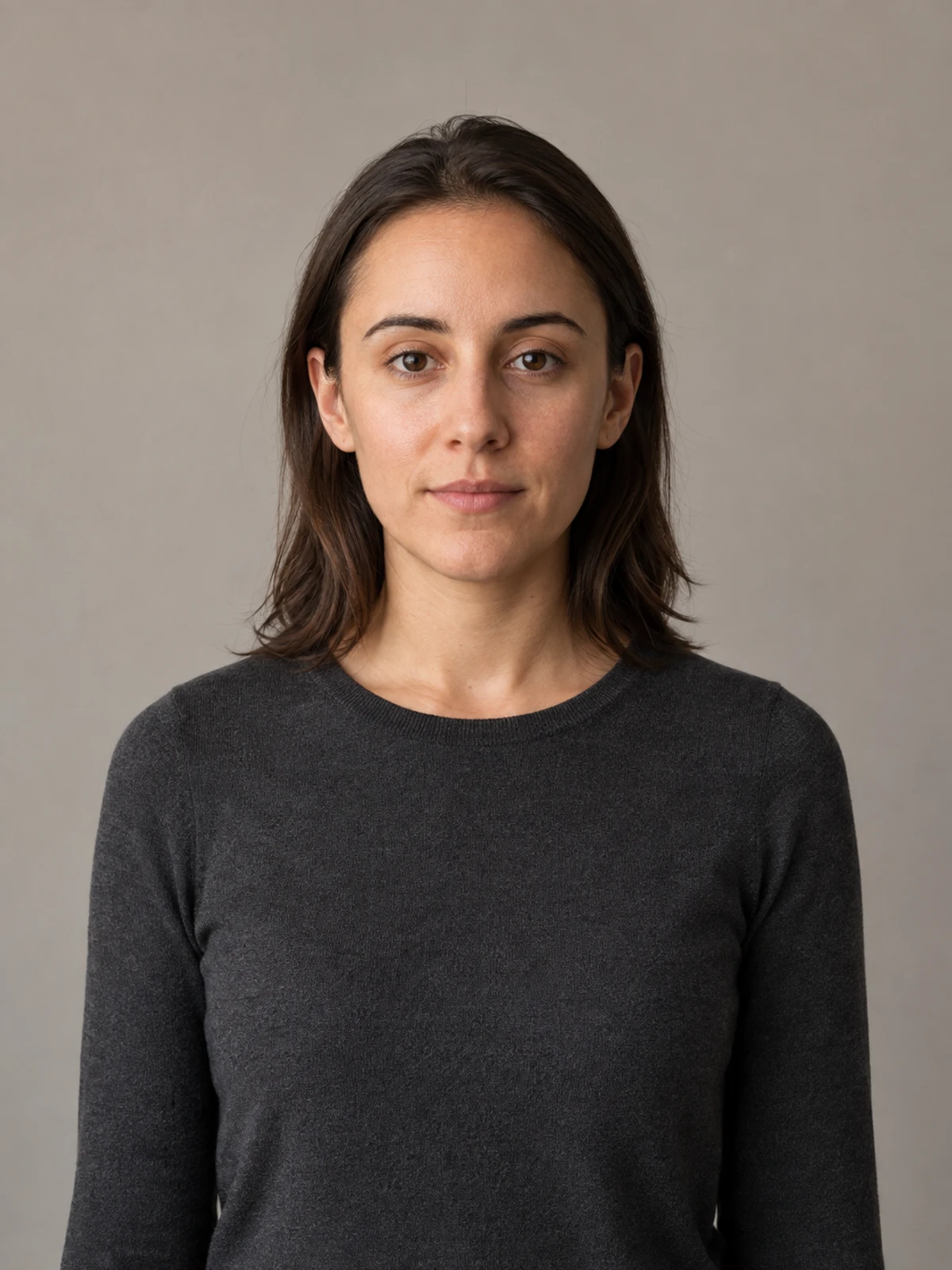
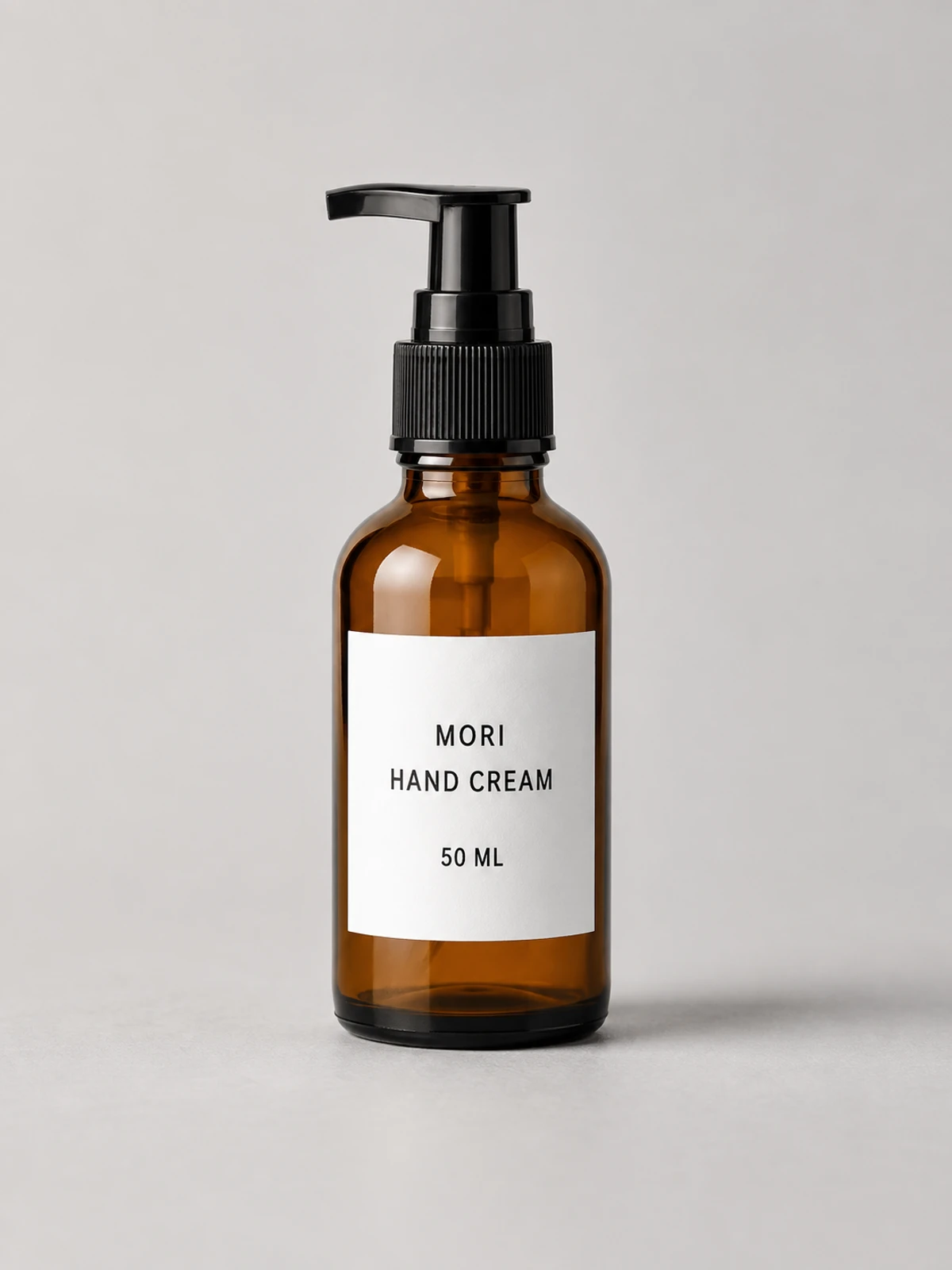
One attempt at the Midjourney relighting task failed without producing an image. It was retried once, and the first returned image is shown below; the retry was not a search for a better-looking result. The test therefore does not represent nine uninterrupted first-attempt successes.
Midjourney offered four candidates, of which only the first was accepted; the other models offered one. The unselected candidates were not retained for evaluation. Latency and operational reliability are excluded from the comparison, and the displayed set cannot establish a model’s typical success rate.
To try the task, use the exact prompt and corresponding reference above, retain the 3:4 ratio, and record the public model version and settings with your result. The test record does not establish a fixed seed or mask configuration. Changed versions, inputs or settings make a new comparison; normalized images and visual scores cannot establish pixel-for-pixel equivalence.
The prompt pattern: preserve, change, prohibit
Every tested prompt follows the same three-part contract:
- Preserve — enumerate identity, geometry, crop, text, material-independent shape, and other invariants.
- Change only — each test specifies one background, lighting, or material transformation so that task completion can be checked separately.
- Do not — state unwanted changes, such as beautification, extra props, new text or face reshaping. These are requirements to check, not enforced protections.
This experiment did not compare submitting several changes together with editing in separate steps. For a larger brief, first consider whether the changes affect each other and whether the next decision needs an intermediate result. See Should you edit an AI image in one pass or multiple steps?.
Make this portrait warmer and put her somewhere nicer
Edit the supplied portrait. Preserve exact identity, expression, hair, clothing, body proportions, crop, and camera perspective. Change lighting only: warm directional light from camera left with cool fill from camera right. Do not reshape the face, smooth skin, change clothing, add objects, or alter the background geometry.
Put the reference and invariants before the new look to make the brief easy to review. This run did not compare different prompt orders, so it does not measure the benefit of that ordering. The complete prompt-engineering guide explains the same structure for generation; the consistent-character guide goes deeper on identity anchors.

A real gallery edit prompt that declares the uploaded product the sole source of truth before describing the new presentation.
View promptHide prompt
{
  "reference": {
    "type": "image",
    "usage": "Use the uploaded image as the sole source of truth. Do not assume product category in advance."
  },
  "scene": {
    "description": "Minimal, premium product presentation layout inspired by high-end industrial design and product documentation.",
    "background": "Pure white, clean, distraction-free"
  },
  "layout": {
    "top_left": {
      "content": "Brand name",
      "style": "Modern sans-serif typography, subtle, elegant"
    },
    "left_column": {
      "content": "Multiple auxiliary product views",
      "views": [
        "Primary front or main view",
        "Secondary side view",
        "Alternate angle or rear view",
        "Detail or top view if applicable"
      ],
      "arrangement": "Vertically stacked, evenly spaced, aligned"
    },
    "right_section": {
      "content": "Main hero product render",
      "style": "Large, dominant, photorealistic",
      "lighting": "Soft studio lighting",
      "materials": "Visually accurate to the uploaded product"
    }
  },
  "visual_style": {
    "aesthetic": "Scandinavian, modern, industrial documentation",
    "mood": "Calm, precise, professional",
    "color_palette": "Neutral and restrained"
  },
  "rendering": {
    "quality": "Ultra-high resolution",
    "shadows": "Soft and realistic",
    "accuracy": "Exact proportions and geometry fidelity"
  }
}
Test 1: replace only the portrait background
Exact prompt
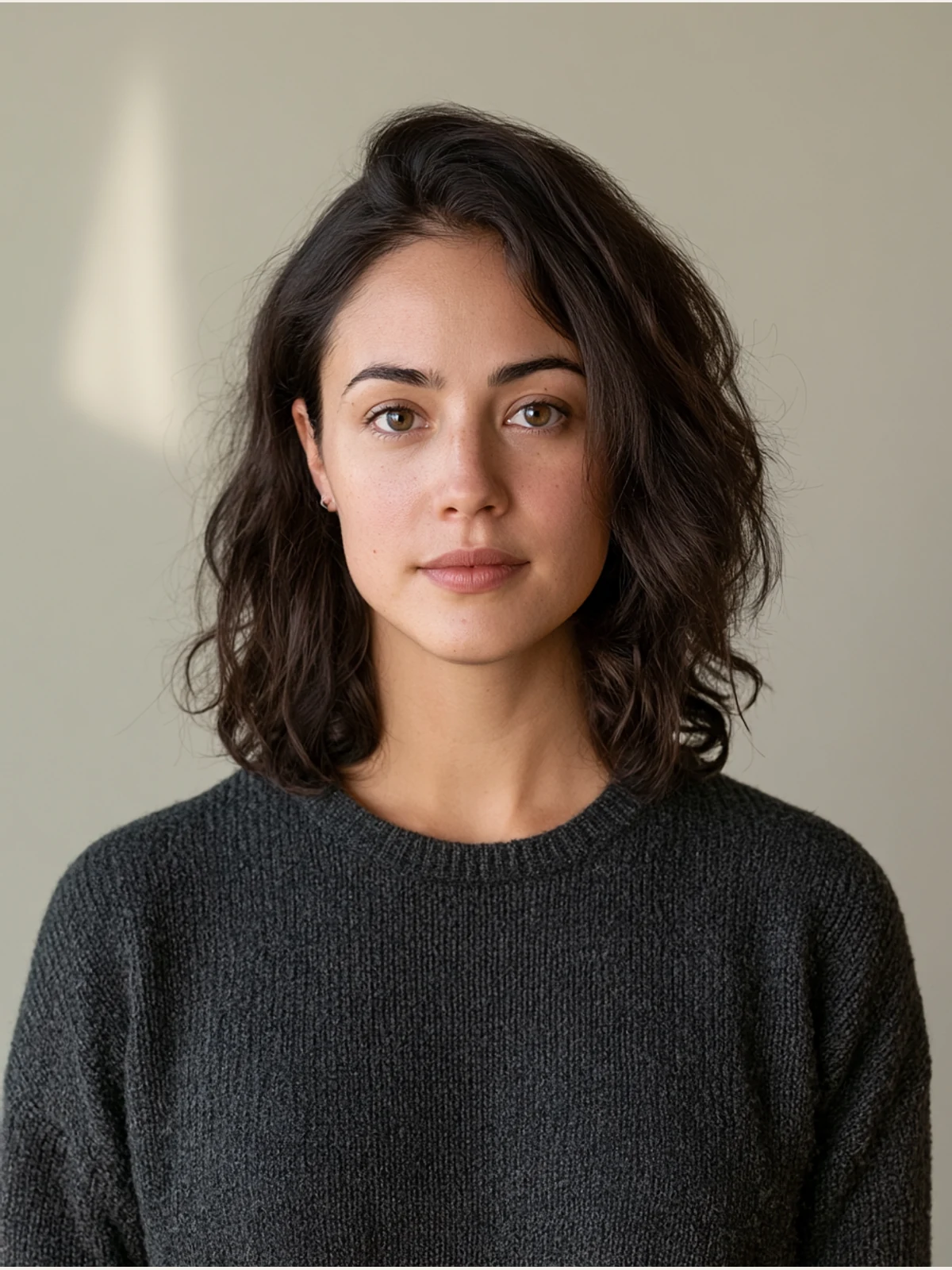
Edit the supplied portrait reference. Preserve the adult subject's exact identity, face shape, skin texture, expression, gaze, hair, charcoal knit top, body proportions, crop, and camera perspective. Replace only the plain background with a softly out-of-focus pale sage plaster wall and a single diffused window-shadow shape. Keep the existing neutral daylight direction and realistic edge detail around the hair. Do not beautify, change age, alter facial features, add jewelry, add text, add logos, or introduce another person.
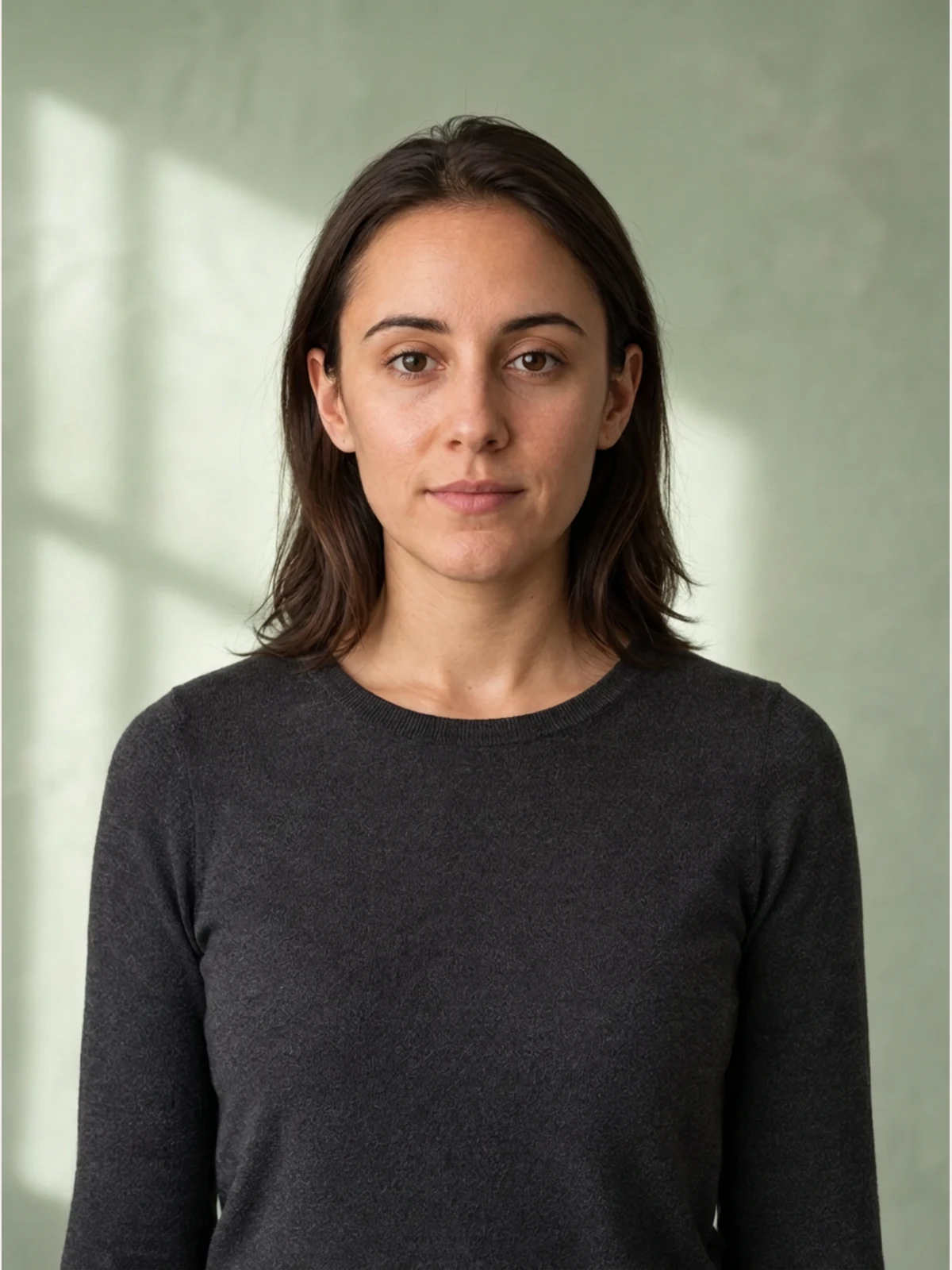
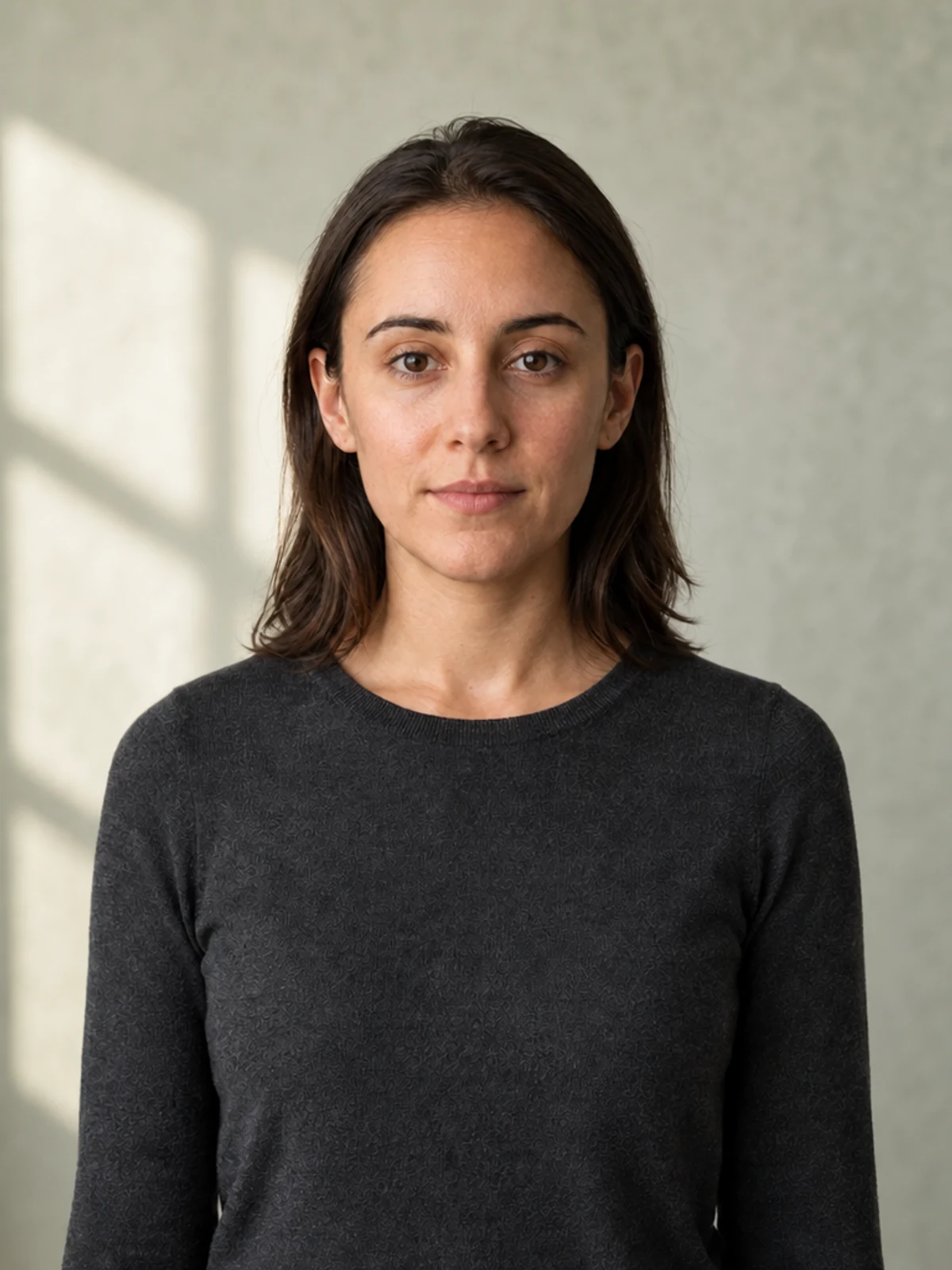
Nano Banana Pro and GPT Image both do the boring thing—and for editing, boring is praise. The face shape, eye spacing, expression, straight shoulder-length hair, charcoal top, body scale, and front-facing crop remain close to the source. Each adds a pale sage wall and one soft window-shadow shape without turning the hair edge into a cutout.
The Midjourney result is an attractive portrait, but not a surgical edit. The hair becomes fuller and wavier, facial proportions move, skin is beautified, and the crop tightens substantially. It solves “make a portrait against a sage wall” while failing the more important instruction: keep this exact person and framing.


Test 2: relight without rebuilding the person
Exact prompt
Relight the supplied portrait reference as a natural late-afternoon window portrait while preserving the adult subject's exact identity, expression, gaze, hairstyle, charcoal knit top, background geometry, body proportions, crop, and camera perspective. Introduce warm directional light from camera left, a soft cool fill from camera right, realistic catchlights, protected skin highlights, and believable shadow transitions. Change lighting and color response only. Do not smooth the skin, reshape the face, change clothing, add objects, add text, add logos, or introduce another person.
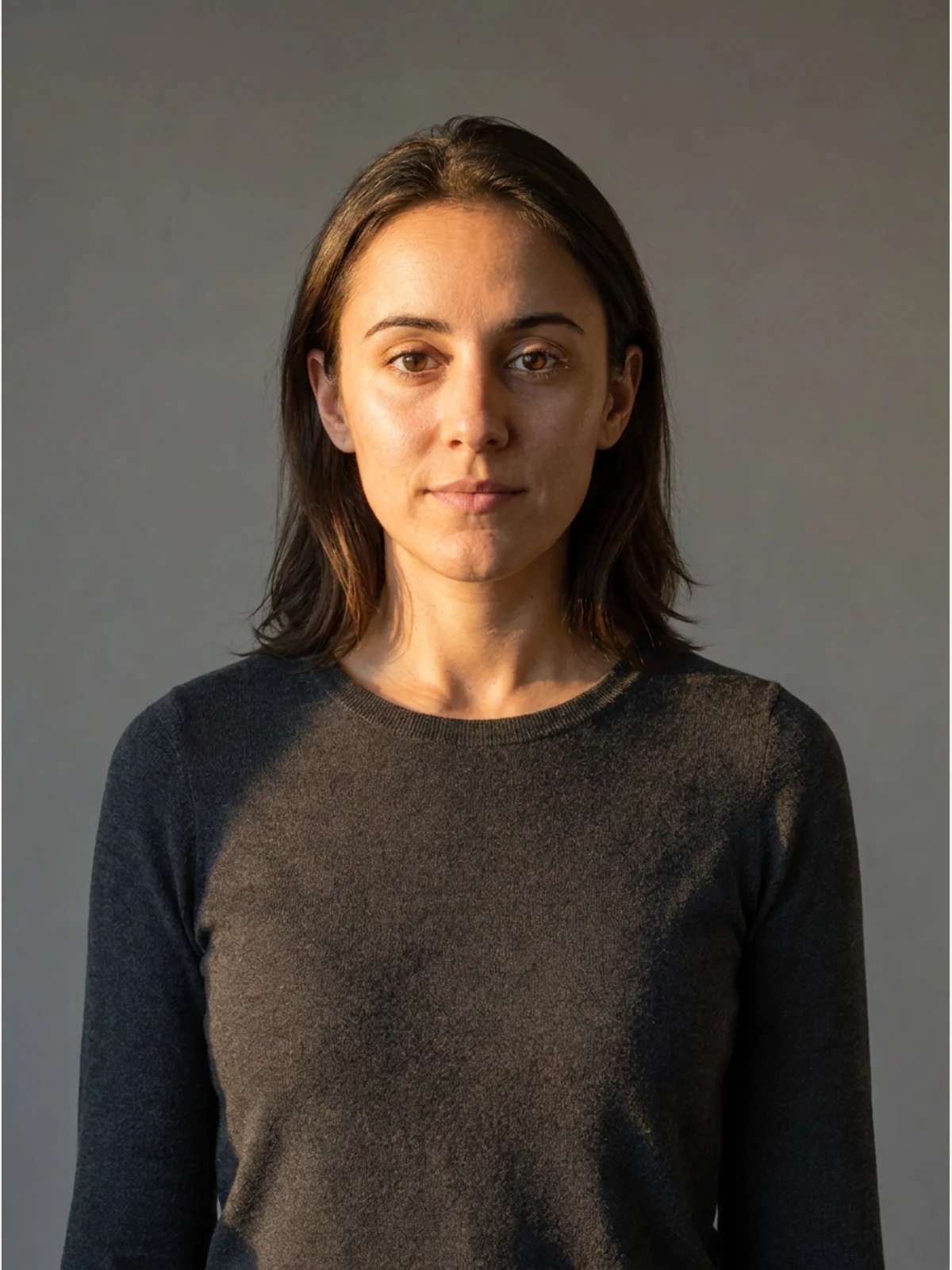
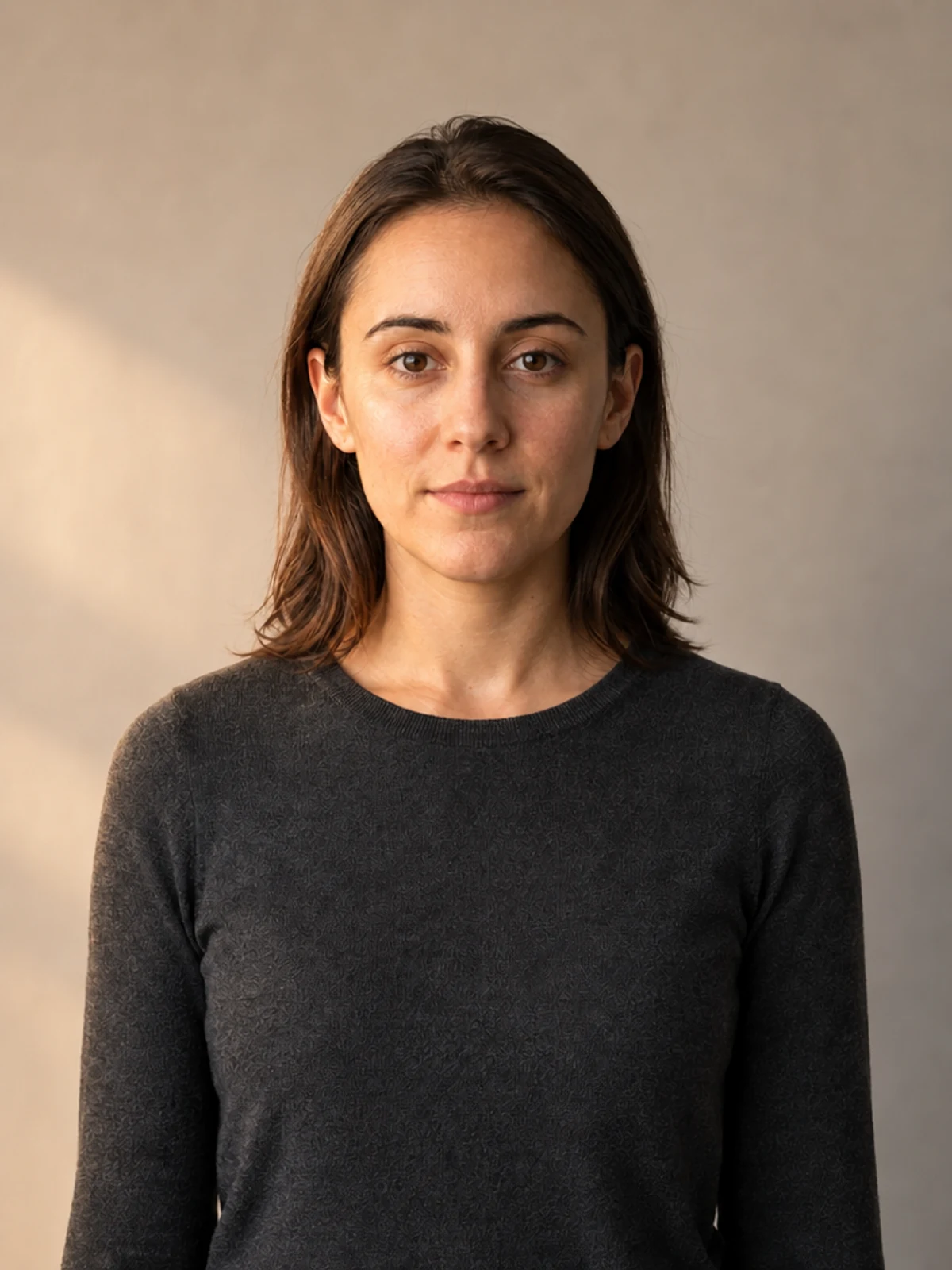
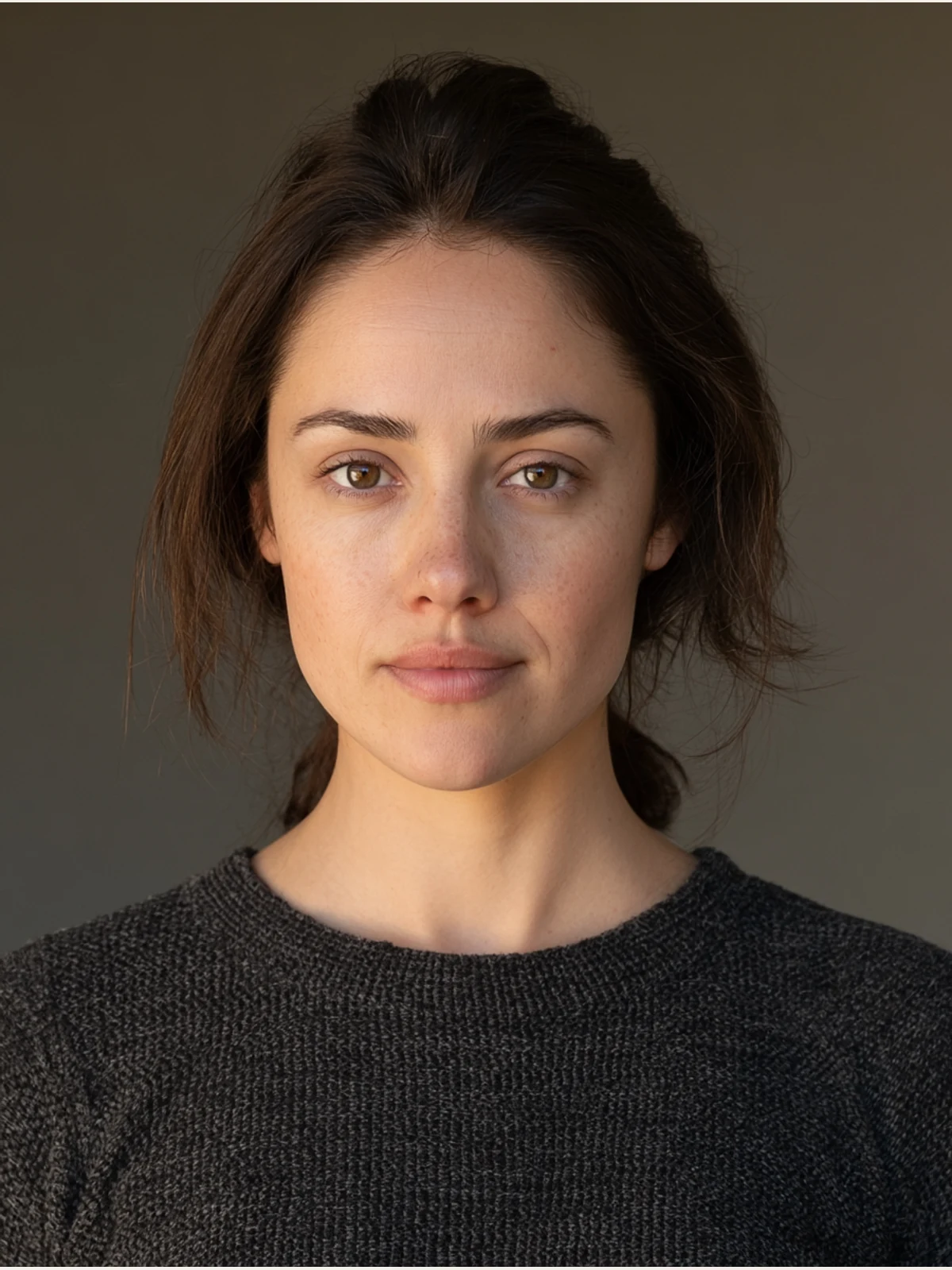
GPT Image delivers the most literal lighting-only edit. The reference face, relaxed mouth, gaze, hairline, garment, body scale, and crop remain close, while warm light enters from frame left and a cooler, quieter side remains on frame right. The background geometry is nearly untouched.
Nano Banana Pro keeps the person and framing well enough for a strong result, but interprets “natural late-afternoon” as a harder beam with a sharper split across the face and torso. It is still recognizably an edit of the reference, hence 4/5 rather than a failure.
Midjourney produces handsome late-day light, but rebuilds the subject: the face narrows and changes, the hair is pulled back, the crop moves much closer, and less of the original body framing survives. Lighting quality cannot compensate for identity loss when the assignment says “change lighting only.” The score applies only to the displayed image; it does not include the earlier failed attempt.

A gallery prompt with a supplied portrait slot and reusable scene logic—the source image owns the person, while the prompt owns the treatment.
View promptHide prompt
{
  "portrait_prompt": {
    "subject": "Based on <User Portrait>, a young woman with voluminous, messy, long hair, wearing a black sporty crop top with white trim and matching black shorts, white calf-high socks. She is sitting perched on a high dark wooden counter or piano top. Her pose is casual and edgy, leaning forward with one hand resting near her mouth, biting her finger slightly, gazing directly at the camera with a sultry, nonchalant expression. A silver bracelet on her wrist. Background includes a white wall with vintage posters taped up and brown wooden blinds. Foreground details include the neck of an electric guitar, a glass jar of cookies, and liquor bottles",
    "composition": "Full body shot, 35mm focal length, slightly low angle to emphasize leg length, sharp focus on subject with hard flash fall-off, messy but balanced framing",
    "camera_angle": "Eye-level relative to the seated subject, slightly low angle from the floor, medium distance",
    "lighting": "Direct on-camera flash photography, hard lighting creating a sharp drop shadow on the wall behind the subject, high contrast, reminiscent of 90s point-and-shoot aesthetics, no diffusion",
    "color_palette": "Vintage film aesthetic, Kodak Gold 200 simulation, warm tones from wooden blinds and furniture contrasted with cool white flash light, deep blacks, slightly grainy texture, lo-fi indie vibe",
    "mood": "Indie sleaze, candid, rebellious, cool girl aesthetic, raw and authentic, Y2K retro fashion editorial, snapshot style",
    "negative_prompt": "soft lighting, studio lighting, bokeh, professional studio portrait, airbrushed skin, 3d render, cartoon, illustration, distorted hands, missing guitar strings, floating objects, anatomical errors, stiff pose, over-processed, HDR"
  }
}
A conditional gallery task where one element keeps its colour and everything else changes. Good edits make the invariant just as explicit as the transformation.
View promptHide prompt
A studio-style close-up editorial portrait of a person with strong, well-defined facial features and slightly imperfect, natural skin texture. The subject wears a black tailored turtleneck with sharp, clean lines, layered under a high-collared black jacket in a minimalist contemporary fashion style.

The subject wears semi-transparent orange acetate sunglasses — rectangular frames with softly rounded edges, glossy finish, and amber gradient lenses — serving as the only colored element in the image.

Color concept: selective color photography — monochrome black-and-white image with only the sunglasses in vivid orange.

Mood is calm and confident, serious expression, direct gaze into the camera.

Lighting is soft frontal studio light with gentle shadows, even skin tones, cinematic contrast, and visible natural skin texture. Shot on a professional portrait camera, f/2.0, ISO 100, 1/125s. High resolution, ultra-sharp focus on the face.

Style: editorial luxury fashion portrait, photorealistic, professional studio photography, no illustration, no painterly effects.
For more precise light vocabulary, use the lighting-keyword guide and camera-settings prompt guide.
Test 3: change material while preserving exact packaging text
Exact prompt
Edit the supplied fictional hand-cream pack shot. Change only the amber bottle material to translucent frosted sage-green glass while preserving the bottle silhouette, black pump, white label shape, centered composition, camera angle, shadows, background, and photographic realism. The label must still read exactly "MORI", "HAND CREAM", and "50 ML" with the same spelling, capitalization, order, and clean black lettering. Do not add any other readable text, logo, symbol, prop, hand, or brand mark.
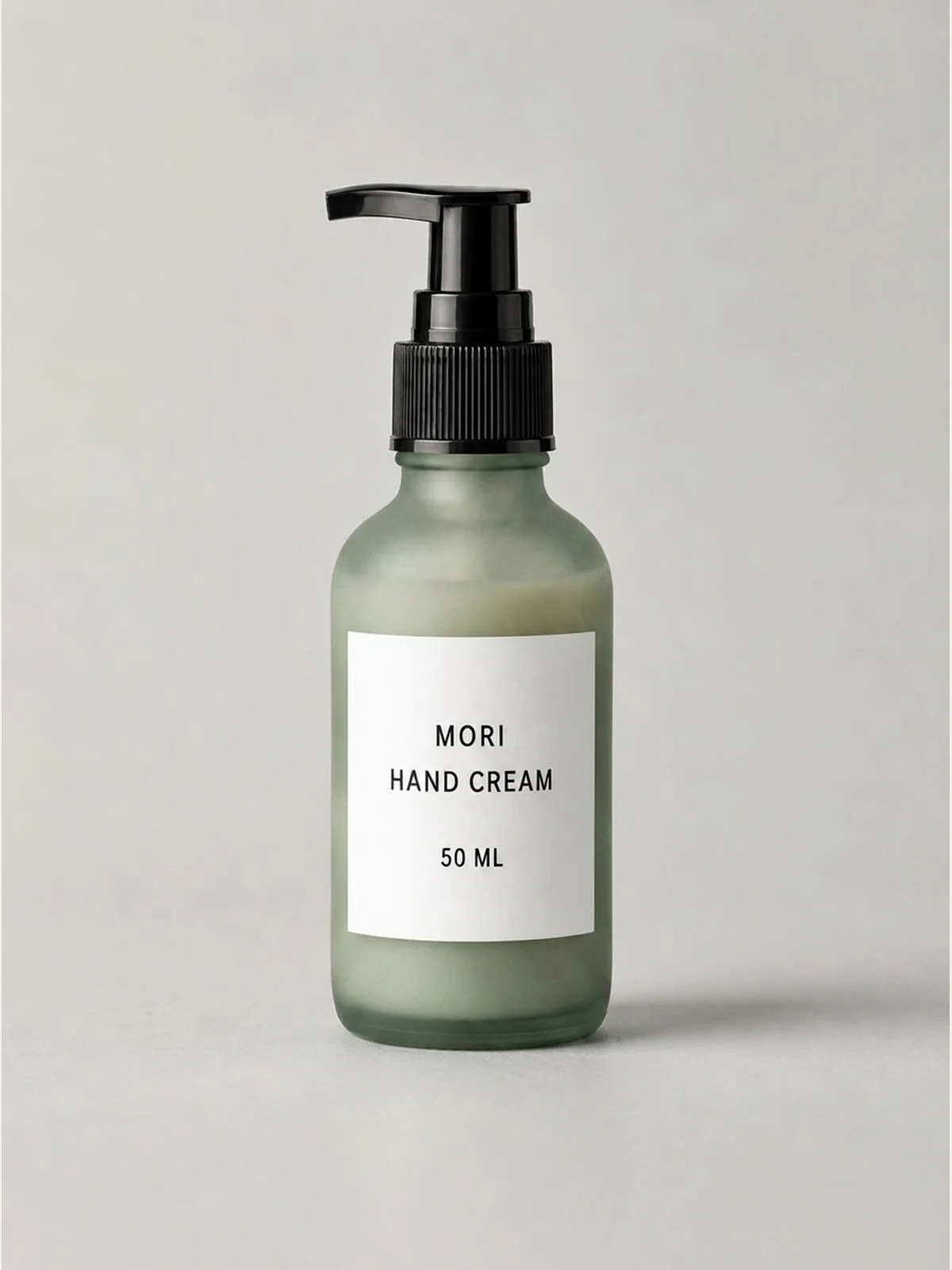
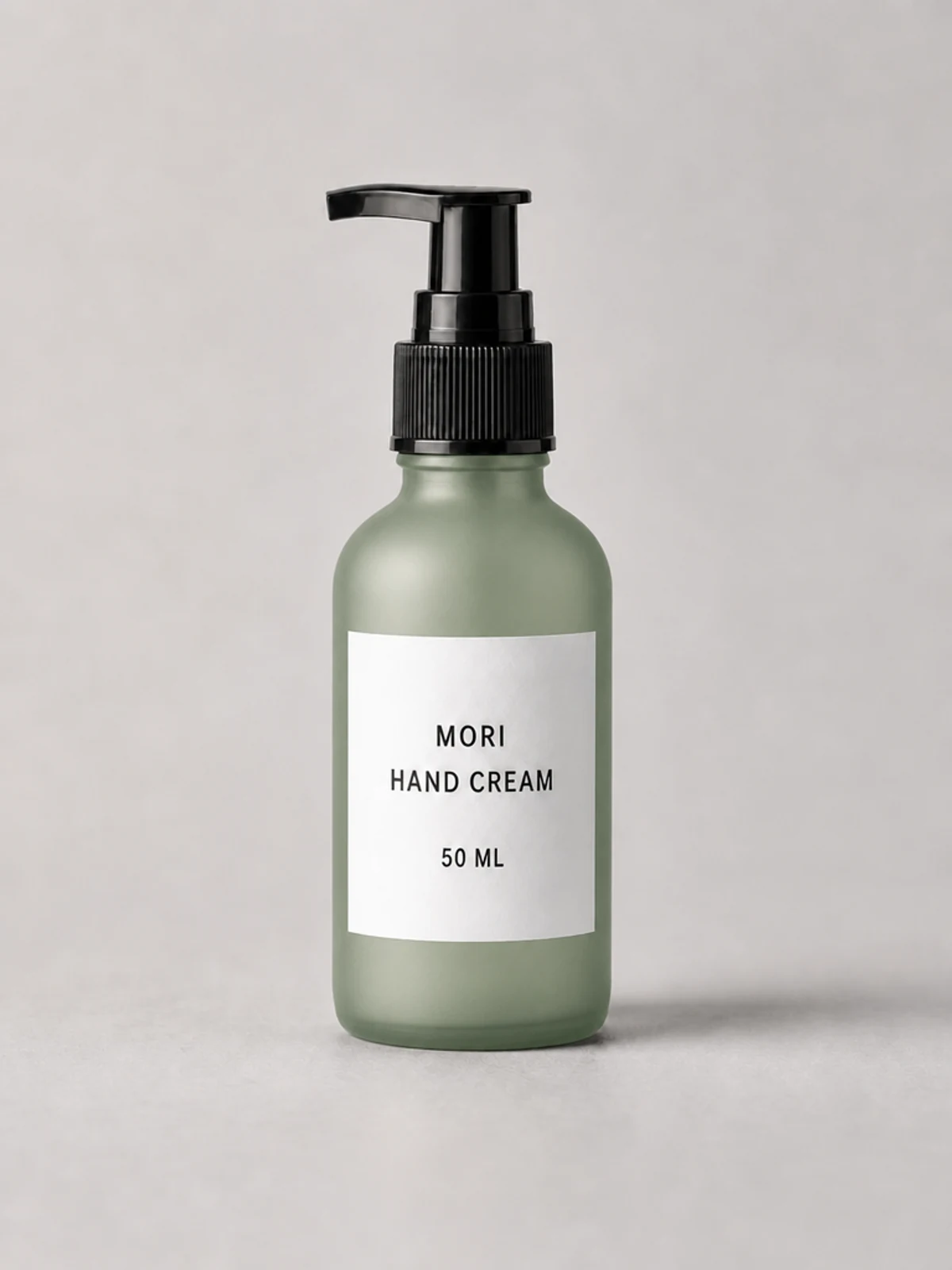
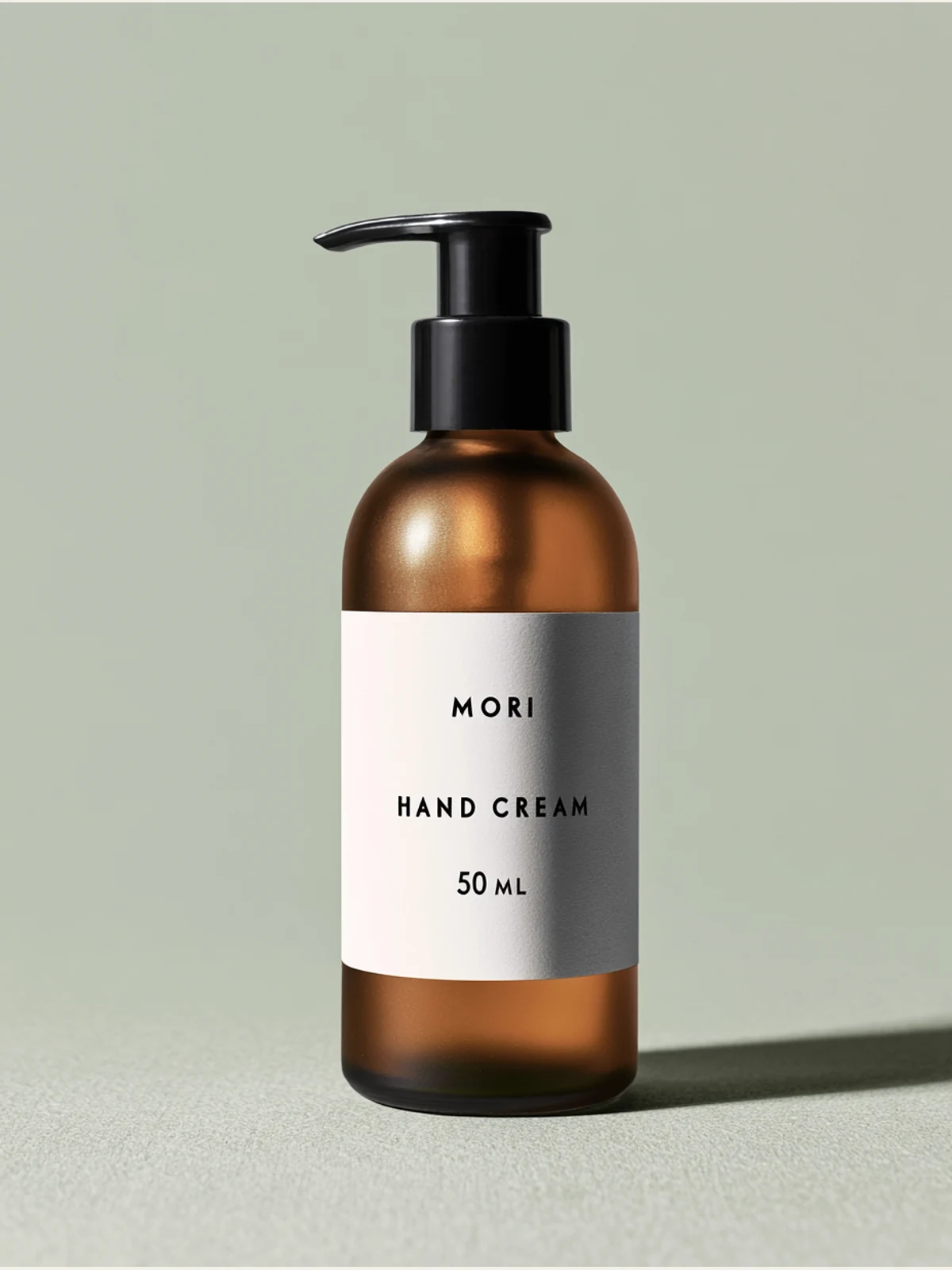
Nano Banana Pro executes the whole contract most cleanly: amber becomes translucent frosted sage green; the silhouette, black pump, white label, centered pack-shot logic, and background stay close; MORI, HAND CREAM, and 50 ML remain exact.
GPT Image also changes the bottle to frosted sage green and preserves all three lines exactly. Its bottle and rendering shift slightly more from the source, so it lands at 4/5, so any intended commercial use still needs a check against the actual product and delivery requirements.
Midjourney delivers the most revealing miss. It preserves every requested word—MORI, HAND CREAM, and 50 ML—yet the bottle remains amber-brown. The backdrop turns sage and the product is restaged instead. This is why a text-perfect image can still fail an edit: the changed pixels are in the wrong place.


A reusable AI image editing prompt template
When diagnosing a single-operation edit, copy this structure and replace every bracketed slot with something visible and testable. The template follows this experiment's scope; it does not require all related changes to become separate steps:
Edit the supplied [portrait/product/scene] reference. Treat it as the source of truth.

PRESERVE EXACTLY:
- [identity, facial geometry, expression, hair]
- [object silhouette, label shape, readable text]
- [crop, camera angle, perspective, background geometry]

CHANGE ONLY:
- [one background, lighting, material, colour, or wardrobe variable]
- [where the change begins and ends]

ACCEPTANCE CHECK:
- [exact required text, count, colour, direction, or material]

DO NOT:
- [beautify, reshape, recrop, add props, add text, add logos, alter untouched regions]
The template gives you a checkable boundary: “change only the amber glass” identifies both the permitted change and what to inspect. It cannot enforce that boundary by itself. For larger visual sequences, use the same invariant/variable split from the multi-panel guide.
Start a reference edit in LocalBanana
- Read the portrait reference and editing steps, open Generate Image from the sidebar, and upload the image whose person or product you want to retain. Copy the matching Test 1, 2, or 3 prompt and replace only details that differ in your source.
- Select a currently available model that accepts reference images, set the aspect ratio, and record the model and any exposed quality or size settings before generating. Use the historical test conditions for comparison; a newer model is a new test.
- Save the first result and compare it with the original using the checklist below. If identity or clothing drifted, return to the original reference before testing a revised instruction. Keep the failed output so you can tell whether the revision helped.
If you start from a gallery example, Use prompt fills the composer with the prompt and supported defaults; it does not supply the example's original reference image or all generation settings. Copying and using gallery prompts explains what you need to add yourself. For an image already open in the result view, Copilot → Edit Image accepts an edit instruction using that image.
LocalBanana's ordinary image generation flow uses reference images and natural-language instructions; it does not offer a mask brush to protect the subject region. Use the layer-compositing workflow above when preserving the source pixels is a delivery requirement.
What to inspect before shipping
Do not stop when the requested change appears. Compare the output against the source in this order:
- Identity or product geometry — face shape, hairline, silhouette, pump, label bounds.
- Crop and perspective — a closer portrait is not the same edit, even when the face looks plausible.
- Untouched regions — background during a relight, clothing during a face edit, text during a material swap.
- Exact text — spelling, capitalization, punctuation, line order, and extra copy.
- The requested change — did the model alter the correct pixels, or merely recolour the surroundings?
The last check catches the Midjourney bottle result: a sage scene is not a sage bottle. The first two catch both Midjourney portrait results. A disciplined review is more valuable than another paragraph of flattering adjectives.
For model selection beyond these three edits, use the current AI image generator comparison, then browse Nano Banana prompts, GPT Image prompts, or Midjourney prompts to study real task shapes before running your own reference in LocalBanana.
FAQ
How are this article's single-operation prompts organized?
Name the supplied image as the source of truth, list every invariant, specify the single operation being tested, define a visible acceptance check, and end with explicit prohibitions. This makes “preserve X; change only Y; do not alter Z” testable. The experiment did not compare prompt-writing strategies or ways to group multiple changes, or estimate their reliability.
Which model was best for AI image editing in this test?
There was no universal winner. Nano Banana Pro and GPT Image tied on background replacement; GPT Image led the relighting task; Nano Banana Pro led the material-and-label edit. Midjourney scored lower on all three displayed outputs because it changed identity or failed to change the requested material. Those findings apply only to this dated, single-run set.
Can I change the background without changing the person, clothing, or lighting?
For strict preservation, retain the original subject layer and replace only the background beneath it. For a generative edit, supply the source photo, use Test 1's background-only prompt, and check the output against the original; the text cannot guarantee an unchanged face or garment. Test 2 deliberately changes subject lighting, so it is a different task. Choose a background compatible with the original light if that light must stay fixed.
How do I keep product-label text exact during an edit?
Quote every required line, state spelling, capitalization, and order, and forbid any other readable text. Check the words and the actual requested transformation separately. In this run, one result preserved the complete label but failed the material edit.
Was the Midjourney retry cherry-picking?
No quality selection was made after a successful image. An earlier attempt failed without an output; it was retried once and the first returned image was used. That difference in attempts, together with candidate-count differences, is why this article does not compare speed or operational reliability.