Spatial Instructions in AI Images: A Three-Cup Tea-Table Test
Compare eight tea-table outputs across four model conditions, checking object count, left and right, orientation, spacing, and boundaries separately.
On this page
A picture can contain every requested object and still fail the brief. Count, placement, orientation, and visibility answer different questions. Check them separately before judging how polished the image looks.
Our task is a small tea-table still life: three blue cups in the left half, one coral teapot in the right half, and a yellow napkin below it. All eight outputs got the counts and the pot's orientation right. Six nevertheless let the spout cross the midpoint; only the two Banana outputs kept the complete teapot in its required half.
This article uses a fixed spatial brief to compare GPT Image 2.5 Flare, GPT Image 2.5 Sunburst, Nano Banana 2.1, and Grok Imagine Image 2.0. The experiment is deliberately small: two outputs per condition. Its purpose is to expose particular decisions in a real picture, not establish a model leaderboard.
Turn the picture into checkable relationships
Start with the objects, then write what must be true about each. In this brief, “five objects” means three cups, one teapot, and one napkin. The teapot's attached handle, spout, and lid are parts of that object. A cast shadow is not an additional cup.
| Requirement | What the reviewer checks |
|---|---|
| Three cobalt-blue cups | Three separate cup bodies; the blue belongs to the cups |
| Cups in the left half | Each whole cup stays on the image's left side |
| One vertical column | The three cups form a clearly separated top-to-bottom column |
| One coral teapot in the right half | Its full silhouette, including spout and handle, stays right of the midpoint |
| Spout left, handle right | Direction is relative to the image, not an imagined person at the table |
| One yellow napkin below the teapot | The napkin reads as below the pot in the picture and stays in the right half |
| Complete and separate objects | No cut-off objects or overlapping solid silhouettes |
| No added accessories | No saucers, spoons, flowers, words, hands, or other unrequested objects |
The midpoint is a viewing aid, not a decorative line to generate. Imagining it makes “left” inspectable. Soft shadows may cross that line without moving the cup itself; a cup rim crossing it is a different matter.
Also keep an “unclear” option. If two overlapping blue forms cannot confidently be identified as separate cups, do not award a count pass merely because three was requested. Record what prevents a judgment. The whole point is to inspect the returned image rather than fill in the intended scene from memory.
This separation is inspired by object-focused evaluation. GenEval distinguishes properties such as count, position, and color instead of relying only on an overall impression. We use a manual checklist for this particular scene, not GenEval's software or its benchmark scores. GenEval paper
Keep the test brief and the review brief identical
The shared prompt fixes the subject, overhead viewpoint, object colors, image-relative directions, separation, light, and requested 3:4 composition. It uses no image reference. The exact submitted wording is below; copying only the adjective-rich opening would remove most of the actual task.
View promptHide prompt
Create an elegant editorial still-life photograph in portrait 3:4 format, viewed directly from above. On a warm ivory tabletop, place exactly three cobalt-blue ceramic cups, all entirely within the LEFT half of the image, separated in a neat vertical row from top to bottom. Place exactly one coral-red ceramic teapot entirely within the RIGHT half of the image. The teapot spout must point LEFT toward the cups, and its handle must be on the RIGHT side. Place exactly one folded mustard-yellow cloth napkin below the teapot, also in the right half. All five objects must be fully visible and separated, with no overlaps. Soft natural light comes from the upper left. Refined material detail, calm composition, generous empty space. No saucers, spoons, other utensils, flowers, words, people, hands or additional objects.
The request for generous empty space supports separation; it does not authorize an extra accessory to fill the space. The colors bind attributes to objects. A coral cup and blue teapot do not satisfy the brief simply because the palette is present.
We retained every valid output from the two planned requests for each condition rather than picking the most successful one. A service failure without an image must be recorded separately from an image with four cups. The latter is a valid result to inspect, even when it fails the requested scene.
Requested aspect ratio and actual pixel dimensions are also separate facts. Display the full returned image proportionally. Cropping it to a common ratio before judging could hide a boundary violation or delete the very extra object the test is meant to expose.
What was actually run
On October 23, 2026, two separate requests were made for each of four model conditions, using the same English prompt and no reference image. All eight spatial-test requests returned images, and all eight are shown. None was discarded for being less attractive or less compliant.
| Requested condition | Returned dimensions | Requested quality |
|---|---|---|
| GPT Image 2.5 Flare | 768 × 1024 for both | Medium |
| GPT Image 2.5 Sunburst | 768 × 1024 for both | Medium |
| Nano Banana 2.1 | 896 × 1200 for both | No comparable quality grade assumed |
| Grok Imagine Image 2.0 | 864 × 1152 for both | Medium |
All conditions requested portrait 3:4 and the 1K resolution tier. The native dimensions differ; the Banana files are close to, but not exactly, 3:4. We preserve those differences rather than stretch or crop them. “Medium” also does not establish equivalent processing across model families. This is a same-brief comparison, not a claim that every internal setting was matched.
The labels identify the requested conditions. The returned results did not independently confirm the generating model's identity. An AI editor visually inspected the outputs with these labels visible; this is neither a blinded human study nor an automated GenEval run.
Read all eight images before choosing a favorite
The count, cup column, spout direction, handle direction, separation, and completeness are clear in all eight. The discriminating condition is stricter: does the whole teapot remain in the right half? Six pictures put most of it there while allowing the spout to cross the midpoint.
GPT Image 2.5 Flare
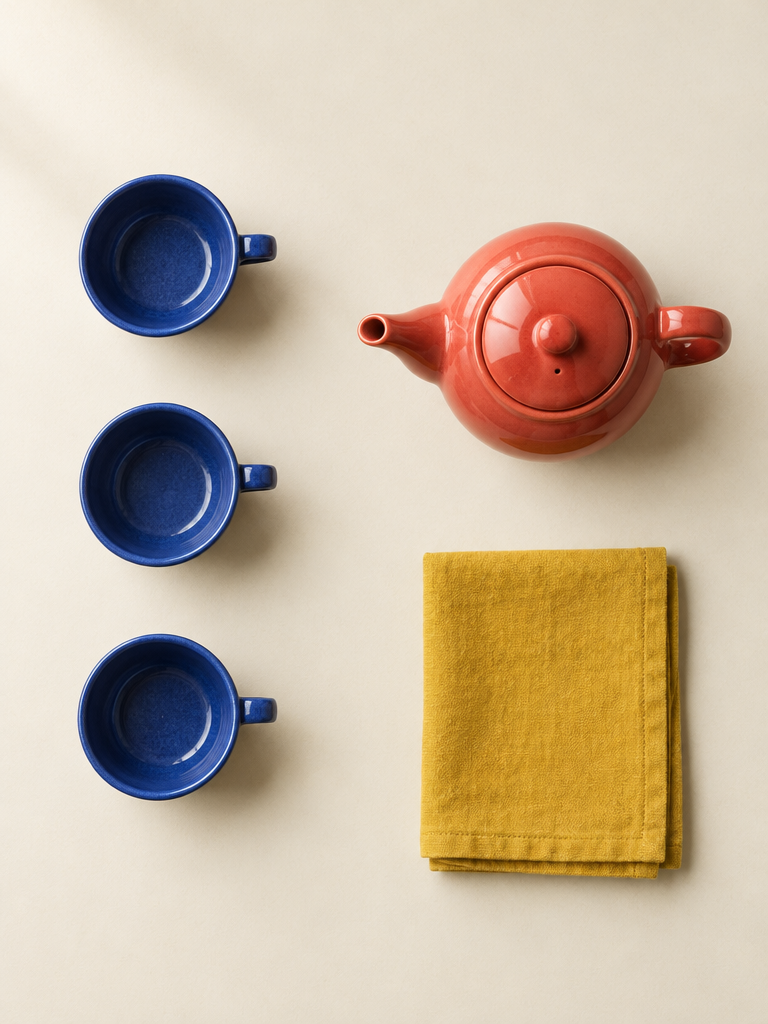
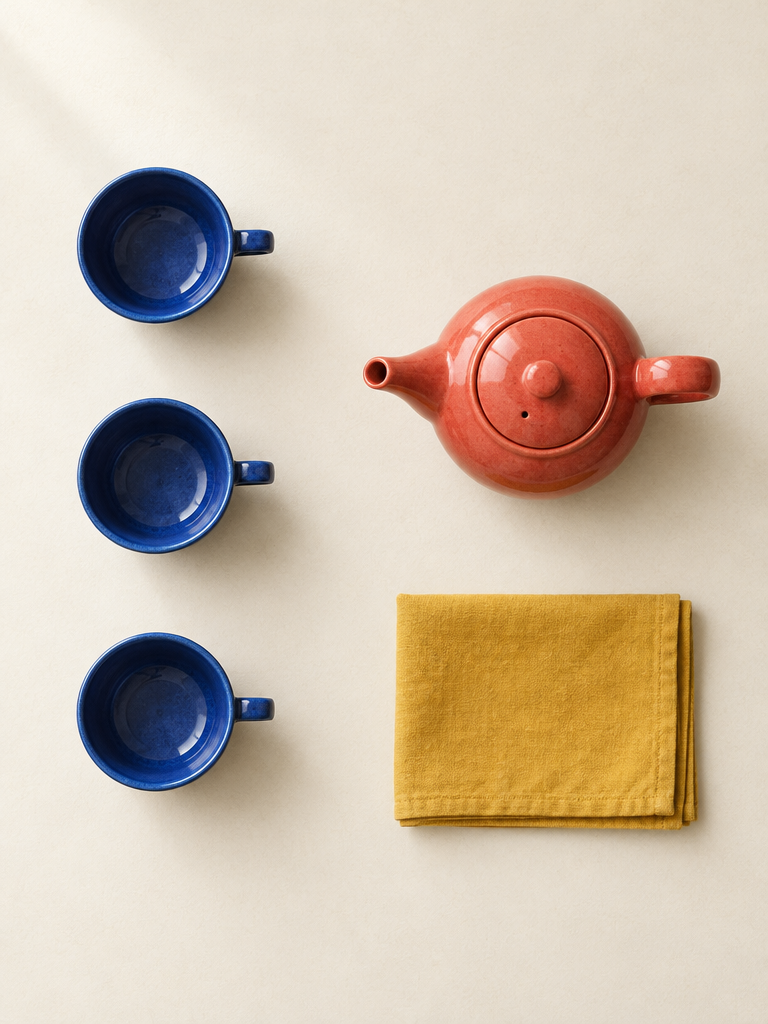
Both arrange the five objects cleanly. They answer “a teapot on the right” convincingly at a glance. They do not meet the more specific instruction to keep its entire silhouette there. The napkins themselves remain in the right half.
GPT Image 2.5 Sunburst
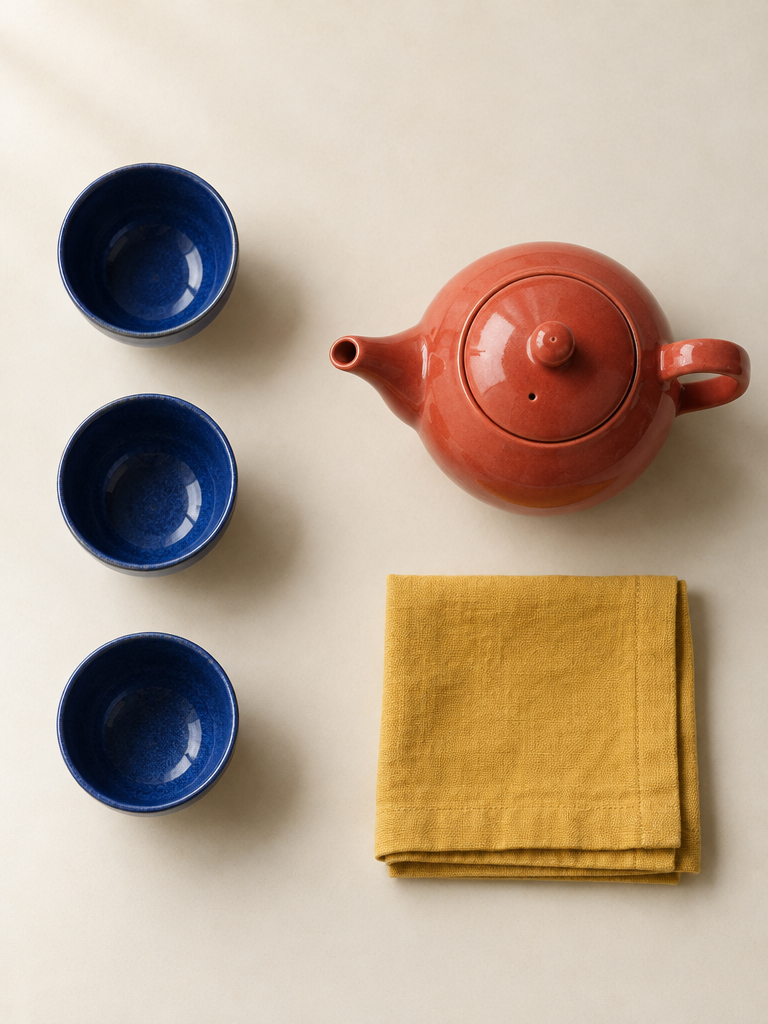
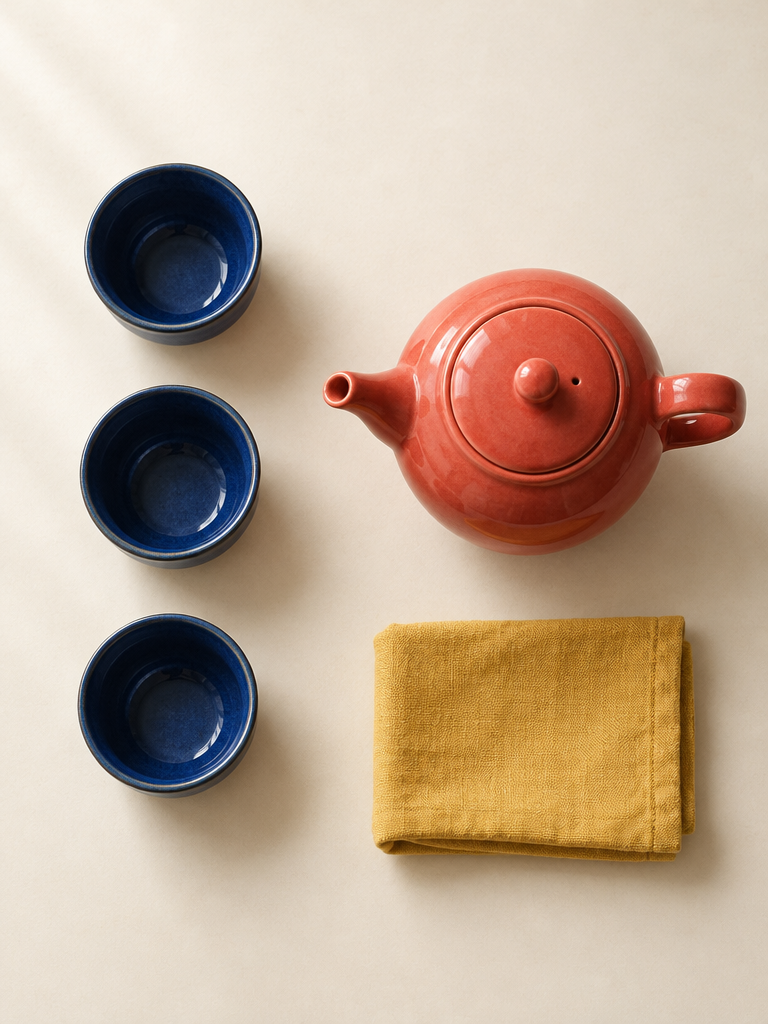
The large teapots and generous cloth shapes are easy to read. That visual clarity does not remove the boundary error. Notice how a slightly crossing napkin edge can be missed when the overall composition feels balanced.
Nano Banana 2.1
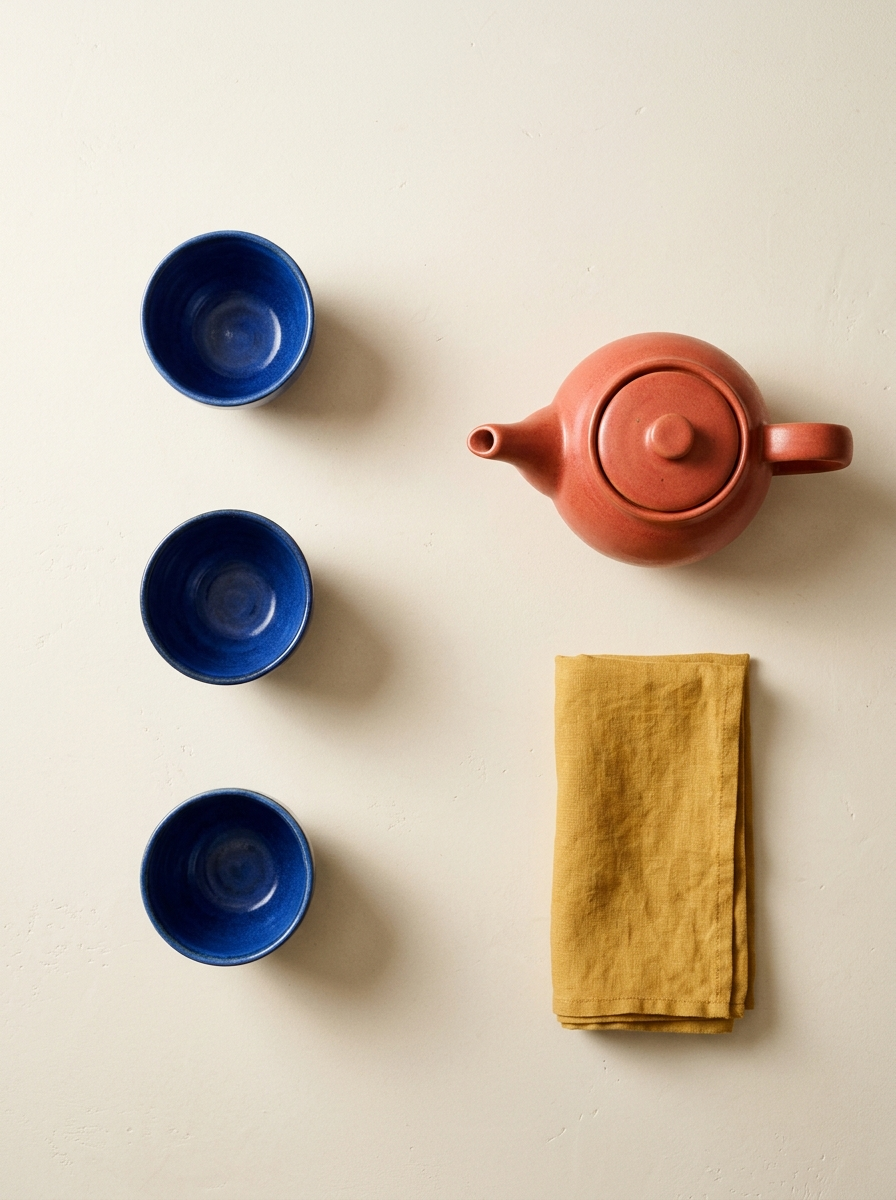
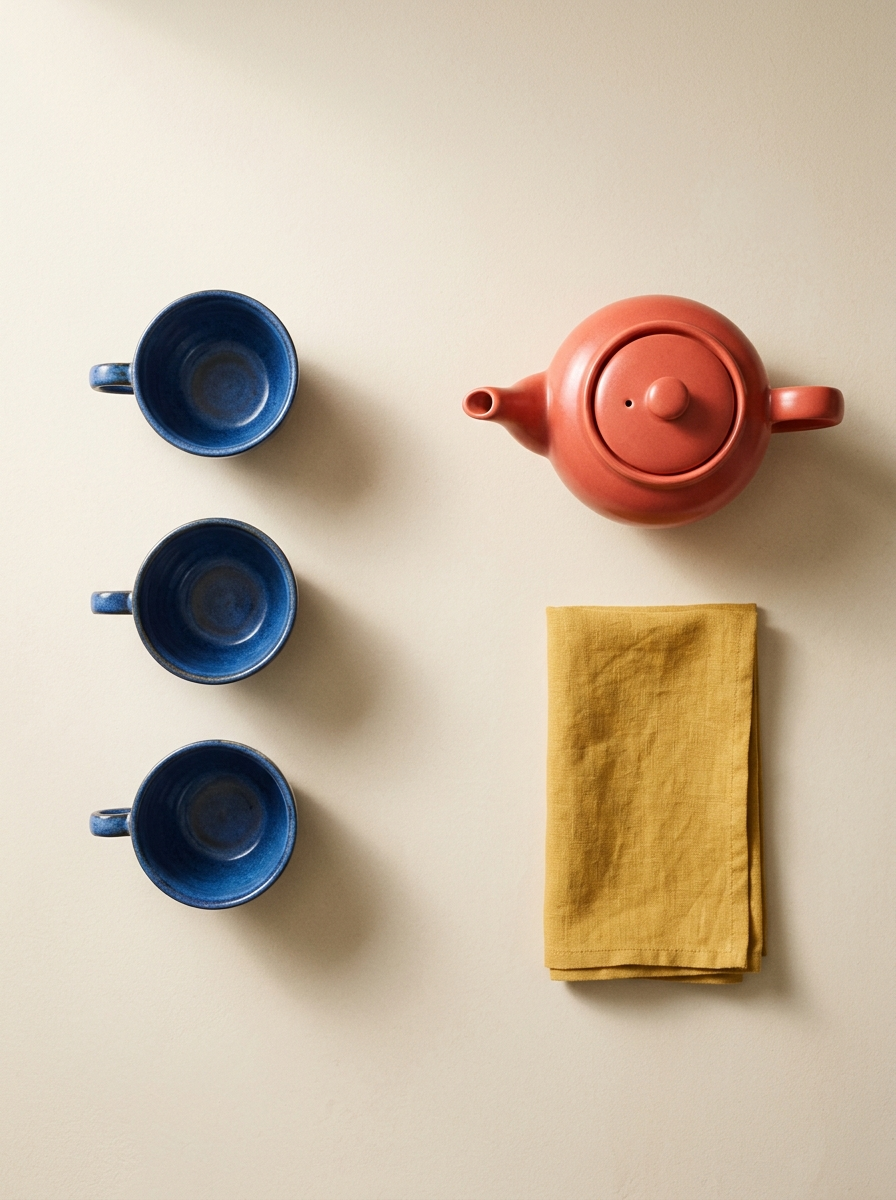
These two meet the recorded object and spatial checks. The cups differ in design between requests; this was not a reference-preservation test. Adding an unstated requirement for handleless cups after seeing the images would change the test.
Grok Imagine Image 2.0
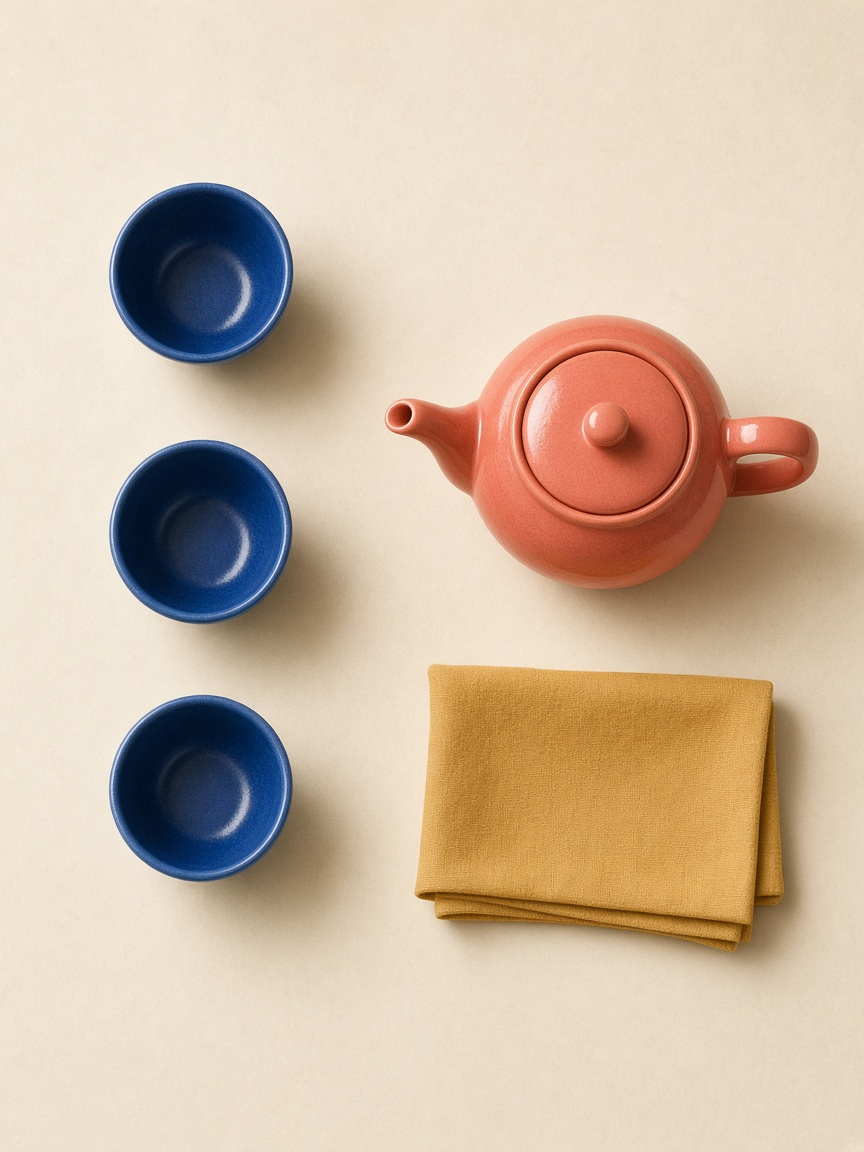
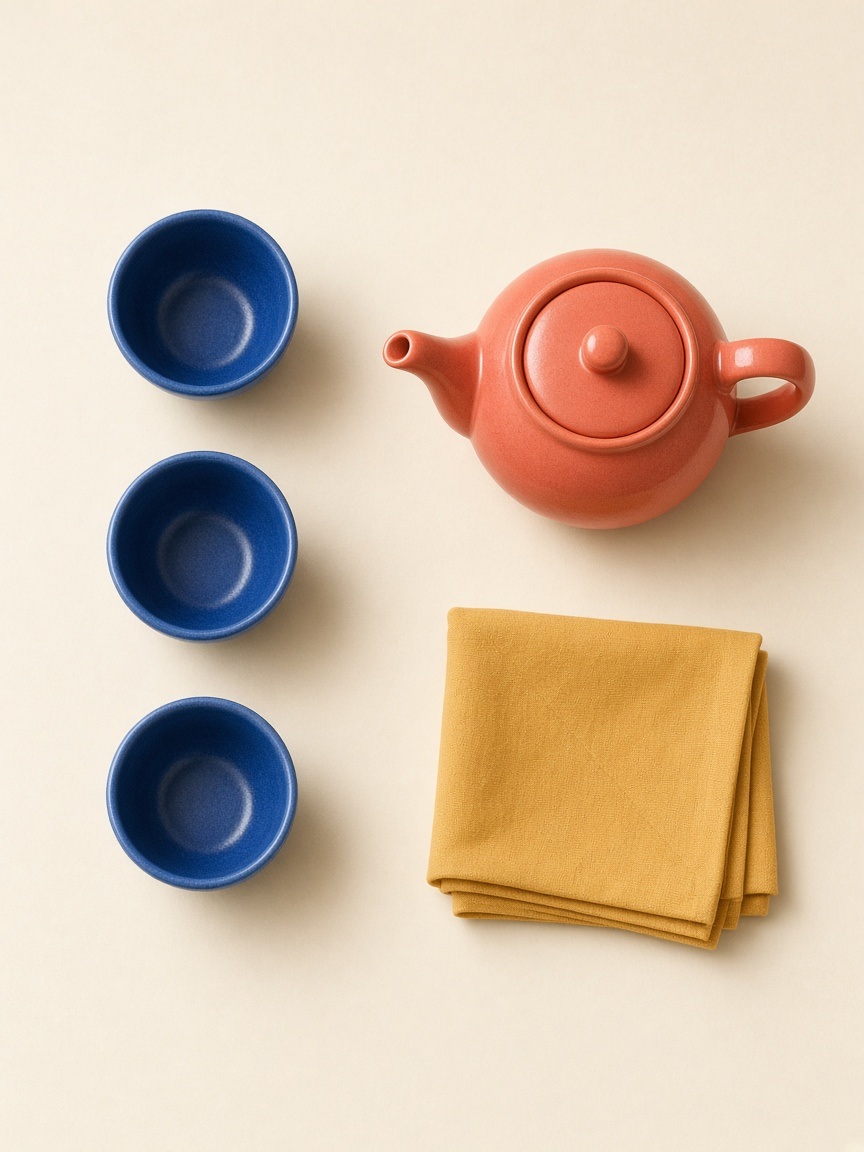
Both keep the expected top-to-bottom arrangement and produce recognizable materials. Like the displayed GPT outputs, they satisfy the relative direction toward the cups while missing the absolute half-frame boundary.
| Condition | Correct object counts | Spout left, handle right | Complete pot and napkin in right half |
|---|---|---|---|
| Flare | 2 of 2 | 2 of 2 | 0 of 2 |
| Sunburst | 2 of 2 | 2 of 2 | 0 of 2 |
| Banana 2.1 | 2 of 2 | 2 of 2 | 2 of 2 |
| Grok Image 2.0 | 2 of 2 | 2 of 2 | 0 of 2 |
Each cell counts only these two displayed outputs. It is not an estimated future success rate.
Inspect the condition that a glance misses
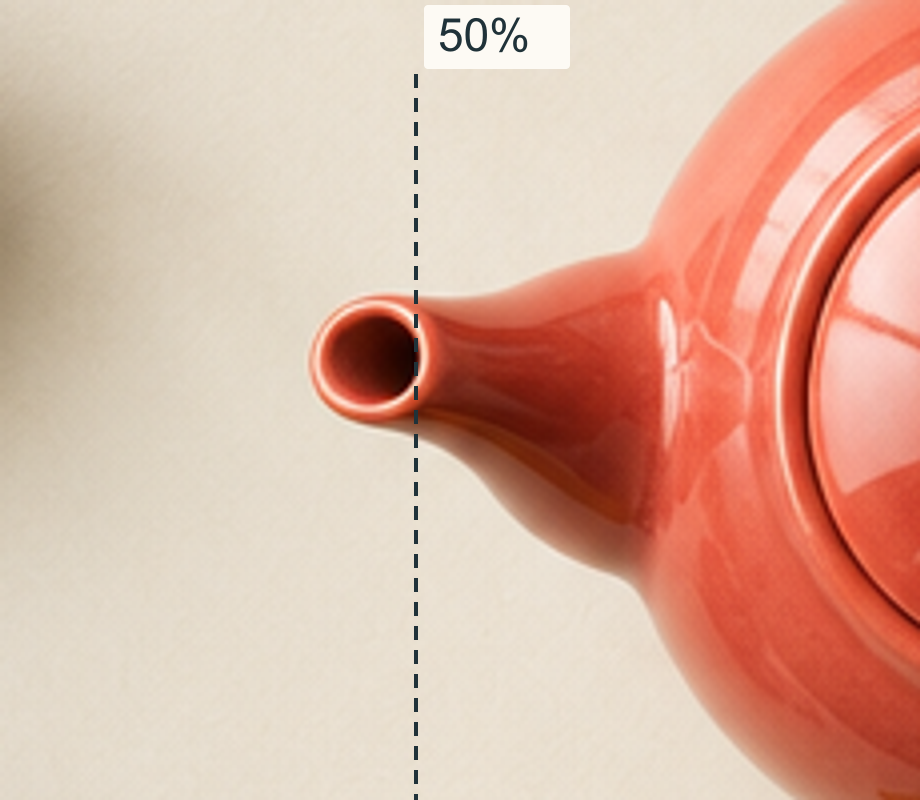
For a 768-pixel-wide image, the midpoint is x = 384; for the Banana and Grok files it is x = 448 and x = 432 respectively. Use each file's own width, not the page column or a neighboring thumbnail.
The spout correctly points left. Its tip also occupies the left half. Those are two different statements, and this brief required the first without allowing the second. The Banana pair demonstrates that both demands can coexist: the pot can sit farther right while still pointing toward the cups.
For this particular failure, do not ask to reverse the spout. A more relevant revision is: “Keep the spout pointing left and the handle right. Place the entire teapot, including both, to the right of the image midpoint; leave visible tabletop between its leftmost edge and the midpoint.” Whether that revision succeeds requires another checked result; it was not tested here.
What the model documentation can tell us
OpenAI documents Flare and Sunburst as separate GPT Image 2.5 models. Google's image-generation documentation includes Nano Banana 2.1, and xAI documents Imagine Image 2.0 for text-to-image generation and editing. Those sources establish available capabilities and names; they do not guarantee that these five objects will land correctly. OpenAI Images 2.5, Google image generation, xAI Imagine Image 2.0
Google recommends specific context and iterative refinement. xAI's prompting guide likewise puts the recognizable subject, count, and viewing direction before styling. Treat those as useful ways to write a request, not as a success-rate claim for this experiment. Google best practices, xAI image prompting
Decide whether the brief conflicts with itself
Before blaming a result on the model, inspect the request. “Put the teapot on top of the napkin” conflicts with this test's requirement that every solid object be separated without overlap. Changing the napkin to sit visibly below the pot resolves that design choice. It is not a model fix; it is a different brief.
Similarly, “left of the teapot” does not necessarily mean “in the left half of the image.” Two objects can both be in the right half while one is left of the other. The shared prompt deliberately states the frame region as well as the direction of the spout. Do not silently substitute the weaker relation during review.
A top-down view also makes image-relative directions easier to communicate. It does not remove every ambiguity: the inside of a hollow cup and its shadow still need to be recognized as parts of one object. Check the physical outline before counting circular shapes.
Rewrite the failed relation, not the mood
A useful correction identifies one visible failure and keeps the successful parts fixed. If the count is right but the column has become a triangle, “make the composition more orderly” does not name the problem. A clearer revision fragment is: “Keep the same three cups; place their centers in one vertical column in the left half, with visible gaps between each cup.”
If the napkin overlaps the teapot, specify the relationship instead: “Place the whole folded napkin below the teapot in the image, leaving a visible strip of tabletop between their outlines.” This does not promise an exact pixel gap. It makes the intended distinction from a mat under the pot explicit.
If the spout points right, ask to correct the teapot orientation while preserving the cups and napkin. Do not rotate the entire canvas by 180 degrees: that would also swap the required left and right regions and turn the cup column upside down. Inspect the handle and spout separately after any edit; a body that looks rotated can still have contradictory attachments.
These fragments are proposed follow-up instructions, not extra runs in this experiment. A successful rewrite would need its own output and the same full checklist. In particular, removing one extra cup is not a success if the edit also removes the required napkin.
Use a small comparison for a small conclusion
Two outputs from one prompt can reveal a repeated error in those outputs. They cannot establish how often a model obeys spatial language across product photography, diagrams, interiors, or other prompts. Nor can a clean result prove that a different count or arrangement will work.
For your own task, choose the failed relation that would make the asset unusable and make it explicit before generating. Keep the original result, revise that relation, and compare the whole picture again. Once the hard requirements pass, assess the light, texture, and visual balance. Refinement is worthwhile; it should not make an incorrect scene look convincingly correct.
For broader composition planning, see the composition guide. The editing guide explains why an instruction to preserve other details still needs a visual check.