
Alt Text for AI Images: Describe the Purpose, Not Every Pixel
Use one flower image to learn informative, decorative and functional alternatives, then pair a complex diagram with a useful text explanation.
On this page
Write alt text for what an image contributes to this particular page. The same AI image may need a visual description in a tutorial, a destination when it is the only content of a link, or an empty alternative when it is purely decorative.
Alt text is a text alternative, commonly supplied through an image's alt attribute. Its job is not to prove that you noticed every petal. It helps someone understand the information or action that would otherwise depend on seeing the image. W3C's image tutorial starts with that purpose-based distinction. W3C WAI: images tutorial
The worked example below is an original AI-generated still life, not a photograph of a real workshop. We will reuse it in different page contexts to see why one permanent description does not fit them all.
Build a small page brief before writing the alternative
Use the flower image and give it three jobs: illustrate an arrangement lesson, introduce a fictional workshop, and link to that workshop's details. You are not trying to find three clever descriptions of the same pixels. You are deciding which information each page would lose without the image.
For each use, note the surrounding heading, the nearby words, whether the image is interactive, and the destination or action if it is. A caption saying “Example arrangement” answers a different question from a link saying “View workshop details.” Record both before editing the alternative.
By the end, you should have an image, its use-specific alternative, any visible caption or full explanation, and a working destination for each link. The example HTML later in the article supplies real markup to inspect. It does not certify an entire website's accessibility.
Start with the sentence around the image
Imagine this image appears in an article about asymmetrical flower arrangements. The paragraph explains that height can sit on one side while denser flowers sit lower on the other. The illustration adds a visible example of that relationship.

An appropriate alternative for that context is:
Orange flowers cluster low in a blue bowl, while a leafy branch reaches high to the left.
It describes the relationship the article is teaching. It leaves out the scissors, wall texture and every individual leaf because those details do not explain that relationship. W3C describes informative alternatives in terms of the image's meaning in context, not a mandatory inventory of visible objects. W3C WAI: informative images
Move the same image into a lesson about preparing a work surface, and the scissors and spare stems might become relevant. Change the page's question first, then reconsider the description.
Revise a plausible but unhelpful description
“Beautiful AI-generated flowers on a table” sounds complete, but it does not explain asymmetry. “Beautiful” is a judgment; the source method belongs in the visible provenance note here; the useful relationship is missing. Replace that wording with the high-left branch and low-right flowers.
Do not swing to the other extreme: counting every blossom and listing each tool can bury the lesson. Keep a detail when removing it would change the reader's understanding. If the page instead teaches tool preparation, the same scissors deserve attention. Relevance is a decision about content, not a rule that a particular object is always worth describing.
Decorative does not mean “unimportant-looking”
Now imagine a workshop details page that already states the activity, place and instructions in ordinary text. The picture provides atmosphere but no additional information needed to understand or use the page. In that context, an empty alternative can be appropriate:
<img src="flower-study.webp" alt="">
Empty means two adjacent quotation marks, not a space, and not the omission of the attribute. Without an alt attribute, some screen readers may announce the filename instead. W3C recommends the empty alternative for decorative images. W3C WAI: decorative images
This decision belongs to the page context. It would be wrong to empty the alternative in the asymmetry lesson simply because the flowers are attractive. There, the image contributes an example the reader needs. A large image can be decorative, and a small image can carry essential information.
Also distinguish “already described” from “mentioned nearby.” The words “our beautiful workshop” do not convey the arrangement's asymmetry. They would not make the image redundant in a composition lesson. On a purely promotional page, however, that visual relationship might not be part of the information being offered at all. Read the whole section before choosing alt="".
If the image is a control, describe the action
A picture alone can also be a link. If selecting the flower image opens workshop details, describing its petals does not tell someone where the link goes. The alternative should communicate that destination. For example, on a fictional workshop site:
<a href="workshop-details.html">
  <img src="flower-study.webp"
       alt="View the botanical workshop details">
</a>
If visible words inside the same link already name the destination, the picture can instead have an empty alternative:
<a href="workshop-details.html">
  <img src="flower-study.webp" alt="">
  <span>View the botanical workshop details</span>
</a>
These are different link structures, not competing universal rules. The goal is one understandable link name without unnecessary repetition. W3C's functional-image examples make the same distinction between an image-only link and an image accompanied by equivalent link text. W3C WAI: functional images
Try the worked HTML example, which includes English and Chinese versions and links to an explanation on the same page. It is a teaching page, not a live booking service. Inspect the image alternatives or use a screen reader to compare how the link is named.
Follow each link once. A good name cannot rescue a wrong destination. In a real site, “View workshop details” should open details rather than silently submitting a reservation. If several different workshops appear together, include enough context for people to distinguish them, such as the workshop name. Avoid making every image-only link say merely “Read more.”
If the picture contributes extra information as well as acting as a link, consider keeping that explanation in a visible caption outside the link while giving the link a clear name. Do not append a long scene description to the action by default. First decide what people need to know to choose the link, then preserve any additional useful information nearby.
A complex explanation needs room outside the alt attribute
Suppose we annotate the arrangement to explain two areas, A and B. The image now supports a more specific lesson. A short alternative can identify the annotated subject and point to the nearby explanation; it does not need to carry the entire lesson in one breath.
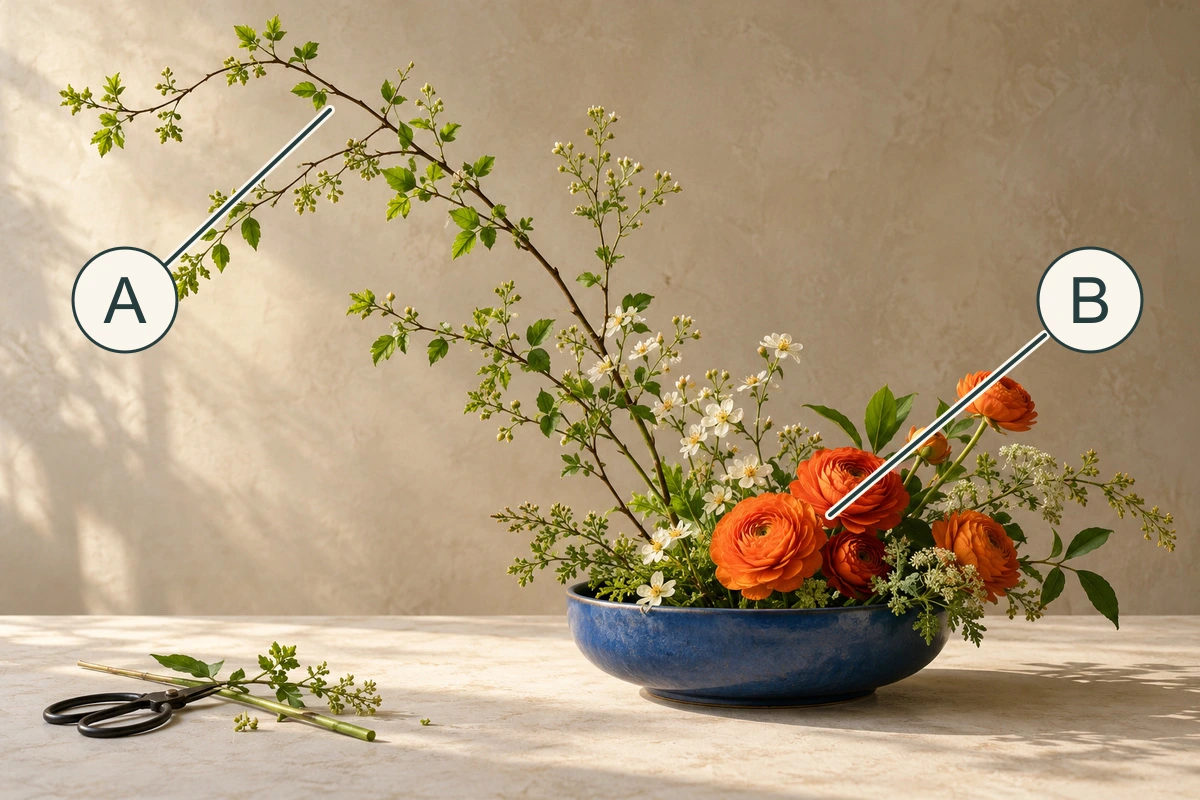
Full explanation: A marks the airy branch reaching toward the upper left. The gaps between its leaves keep that high area relatively open. B marks the denser group of orange flowers close to the bowl on the right. Their different heights and densities create an asymmetrical silhouette. The letters only locate these areas; they do not record a measured ratio or a recommended stem length.
For genuinely complex charts, diagrams or maps, provide their essential information in an accessible explanation or data table as well as a short identifier. W3C recommends making that fuller description available to everyone. A long paragraph crammed into alt is difficult to explore and does not provide the structure of a proper table or section. W3C WAI: complex images
For our A/B example, a figure can group the image with the visible explanation. No special interaction is needed to reveal the main point:
<figure>
  <img src="arrangement-notes.webp"
       alt="Arrangement with areas A and B, explained below.">
  <figcaption>
    A marks the airy branch reaching left and upward.
    B marks the denser orange flowers low on the right.
    Their height and density differ; the labels are not measurements.
  </figcaption>
</figure>
If this were a chart, the full explanation would also need the relevant values and relationships. A sentence such as “an interesting chart” would not preserve them. Before writing more words, ask whether the figure itself can be simpler without losing its purpose.
Handle text in an image as information
A workshop poster may contain a title, date, time and venue. Those words are information, even if the image is attractive. If they appear nowhere else, “flower poster” loses the practical message. Supply the essential wording in a text alternative or, for a longer poster, a clearly associated visible text version that people can read normally. W3C discusses images of text and the value of providing their content as text. W3C: images of text
Do not make someone open a different image to read the supposedly accessible version. And do not assume that decorative letters, a real event address and a photographed brand name all have the same role. Decide which words matter to this page. When you control the web layout, retaining real HTML text is usually the more flexible starting point; the typography guide provides a worked layout.
Keep the caption, alternative and provenance distinct
The caption is visible and can tell everyone how to interpret a figure, where it came from, and what its limits are. The alternative supplies the image's relevant information or function when the image cannot be seen. They may overlap, but copying a long caption into every alternative can make reading repetitive.
For our still life, the caption explains that it is AI-generated and not documentary evidence of an event. The alternative explains the visible arrangement. If the distinction between generated and photographed material is itself part of the lesson, make it available to readers who cannot see the image too—through the surrounding text, caption or appropriate alternative. Do not use alt as a hidden dumping ground for disclosure or search keywords.
An AI-drafted description also needs review. Do not turn an uncertain plant identification into a fact, infer a person's identity, or invent the mood of a real subject. Describe what the page needs and what you can support. In this example, “orange flowers” is sufficient; a precise species name would add an unverified claim without improving the lesson.
For the Chinese version, “蓝色浅钵里的橙色花朵聚集在较低的位置,一根带叶枝条向左上方伸展” preserves the same relationship. It does not mechanically copy English word order. The functional alternative instead becomes “查看植物花艺工作坊详情.” Translating the visual description and using it for the link would still describe the wrong job, however fluent the Chinese is.
Read the page without the picture
Use a simple final check: read the surrounding text and the alternative aloud, without looking at the image. Can you understand the point? If it is a link, can you predict its destination? If it is a diagram, can you find the full explanation?
W3C recommends concise alternatives with the important information first. It generally does not require introductory words such as “picture of”; identifying a medium is useful when the medium matters. W3C WAI: alt-text tips
Check each language in its own page context. Translate the function and relevant meaning, not just the nouns in a stored description. Also check the narrow layout: if a visible link label disappears on mobile, its accessible name must remain understandable.
Finally, do not make an alternative carry information that sighted readers also need. Dates, prices, instructions and chart data belong in ordinary page content when essential. For wording embedded in a poster, see the editable text and layout guide. Good alternative text is one part of a page whose meaning is available in more than one way.
Exercise: review four placements of the same image
Prepare alternatives for these four uses before reading the acceptance notes:
- A lesson compares airy height with a dense base. The paragraph does not yet describe our image.
- A workshop details page already gives every practical fact, and the picture only sets a mood.
- The image alone links to the workshop's details.
- The image and the visible words “View the botanical workshop details” are inside one link, with no additional meaning carried by the picture.
The first answer should preserve the high-left and low-right relationship. The second can use alt="" if the stated decorative condition really holds. The third should name the destination. The fourth can give the image an empty alternative because the same link already has its visible name. These are acceptance conditions, not four strings to paste into every site.
Now change one condition: the visible link text disappears in the mobile version. Inspect what remains in the accessibility tree. Do not assume that text hidden visually is always removed from that tree, or always retained; the implementation matters. The link still needs an understandable name. This final change tests whether you are reviewing the page people actually use instead of only a desktop screenshot.
Save a short handoff note for each placement: page purpose, proposed alternative, caption or longer explanation, link target, and which language and viewport you checked. Automated tools can flag a missing attribute. They cannot decide for you whether a poetic flower description explains the composition lesson. That last judgment requires reading the content.