Which AI Image Generator Renders Text Best? 12 Controlled Outputs
Four typography prompts across Banana Pro, GPT Image 2, and Midjourney V8.2 test spelling, line breaks, numerals, punctuation, and layout obedience.
On this page
The short answer from 12 controlled outputs
In this September 3, 2026 test, GPT Image gave the strongest overall typography control. It won the MAKE IDEAS / VISIBLE poster and the one-line OPEN 24/7 task, then tied Nano Banana Pro on MAKE / ROOM and LESS NOISE. / MORE SIGNAL. Nano Banana Pro matched every requested character and line break, but twice drifted into a physical-poster presentation or let a graphic touch the crop. Midjourney V8.2 kept the requested English words and punctuation surprisingly well, yet changed the requested line structure in three of four prompts.
That is the useful distinction: spelling was no longer the hard part in this small test; layout obedience was. All twelve outputs contained the requested characters, and none invented a readable brand, date or logo. The models separated when a line break, full-bleed field, margin or “no mockup” instruction had to survive alongside the text.
12/12
four prompts, three tested models, one displayed candidate each
4/4
Midjourney kept it in one of four cases
2 wins
plus two ties with Nano Banana Pro
Why use matched prompts?
Independently curated gallery examples differ in prompts, inputs, versions and selection. They cannot establish how often a model gets text right. This article uses four matched short-English tasks, with one displayed output for each model and task.
The gallery examples later on the page are separate references, not additional experiment cells. For other tasks, see the same-prompt three-model test and model-selection guide.
How the test was run
We wrote four briefs: a two-line phrase, an oversized two-word stack, numerals with a slash, and two punctuated sentences. Within each task, the English text was identical for all three models. This was a dedicated generation experiment, not a product-interface walkthrough.
| Model tested | Requested settings |
|---|---|
| Nano Banana Pro | 3:4, 1K |
| GPT Image 2 | 3:4, 1K, medium quality, opaque background |
| Midjourney V8.2 | 3:4, Relax mode |
Each task was submitted once, without rerolls. We retained the first returned candidate, rather than choosing the most attractive one. Midjourney returned four candidates per task and the other models one; only the retained candidate was evaluated. Original output dimensions differed. For display, images were fitted without cropping to a 1200 × 1600 canvas, without changing typography or composition.
The first task reuses the poster outputs from the same-prompt experiment; three additional tasks complete the four-task set. They are not twelve additional outputs on top of that earlier article.
The comparisons below separate four visible requirements:
- Exact text: requested letters, numerals and punctuation, in the requested order.
- Line grouping: words on the required lines.
- Unrequested elements: extra copy, mockups, frames or marks.
- Layout: colour, margins, alignment and supporting shapes.
These are editorial observations of the displayed files, not a blinded or independently replicated evaluation. A visible spelling pass does not imply the full layout passed. We report the concrete differences below rather than treating subjective five-point scores as precise measurements.
Test 1: exact phrase and fixed two-line hierarchy
The first brief asked for MAKE IDEAS on line one and VISIBLE on line two. It also constrained the poster to one cobalt square, one vermilion rule, generous negative space and no mockup frame.
Create a vertical 3:4 contemporary editorial poster on a warm off-white paper field. Set exactly the two-line headline "MAKE IDEAS" on line one and "VISIBLE" on line two, preserving spelling, capitalization, and word order. Use bold black grotesque lettering, a small cobalt-blue square, one thin vermilion rule, generous negative space, crisp alignment, and subtle printed-paper grain. The quoted headline must be the only readable text. Do not add a logo, signature, date, mockup frame, extra letters, or brand mark.
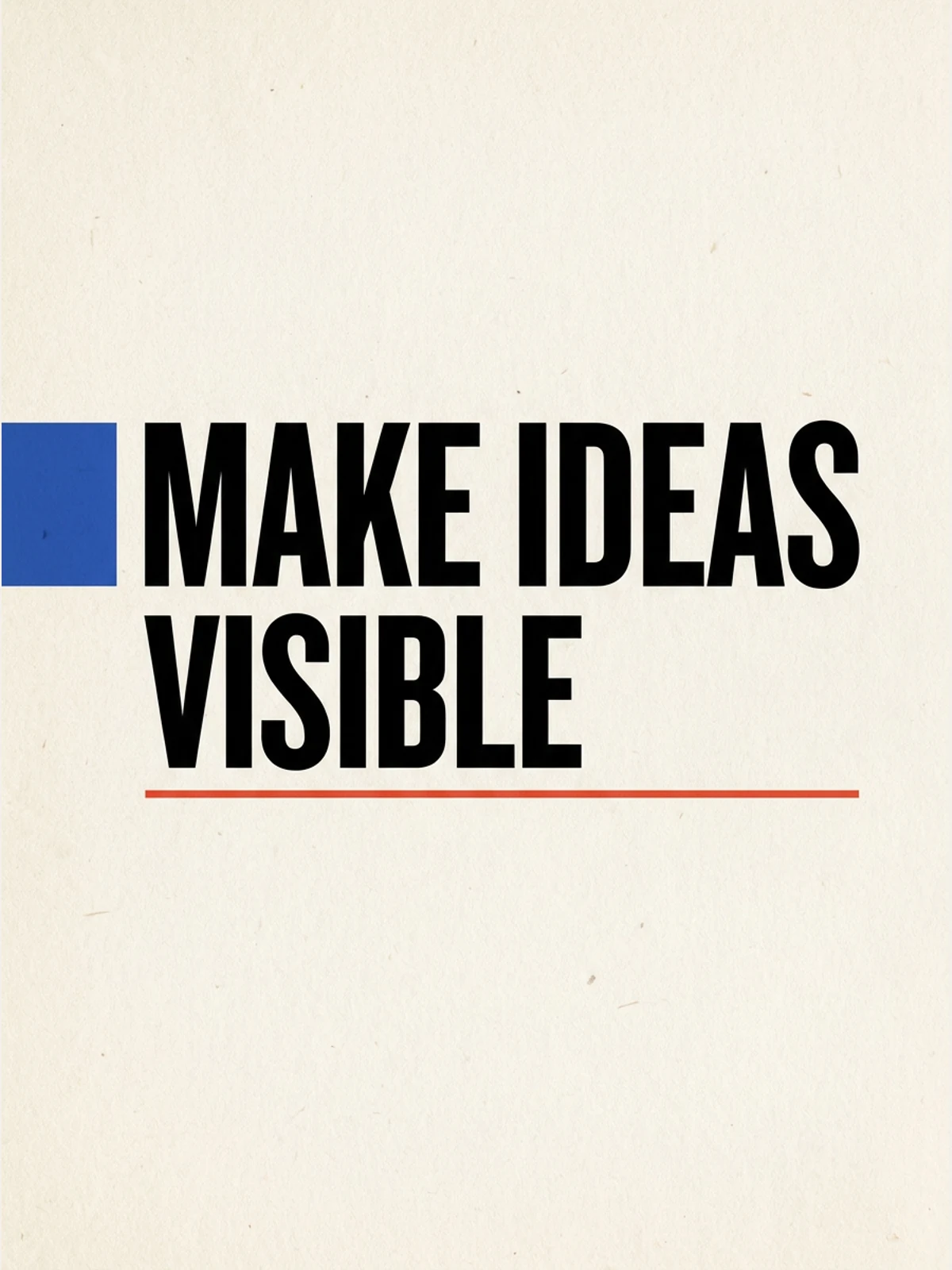
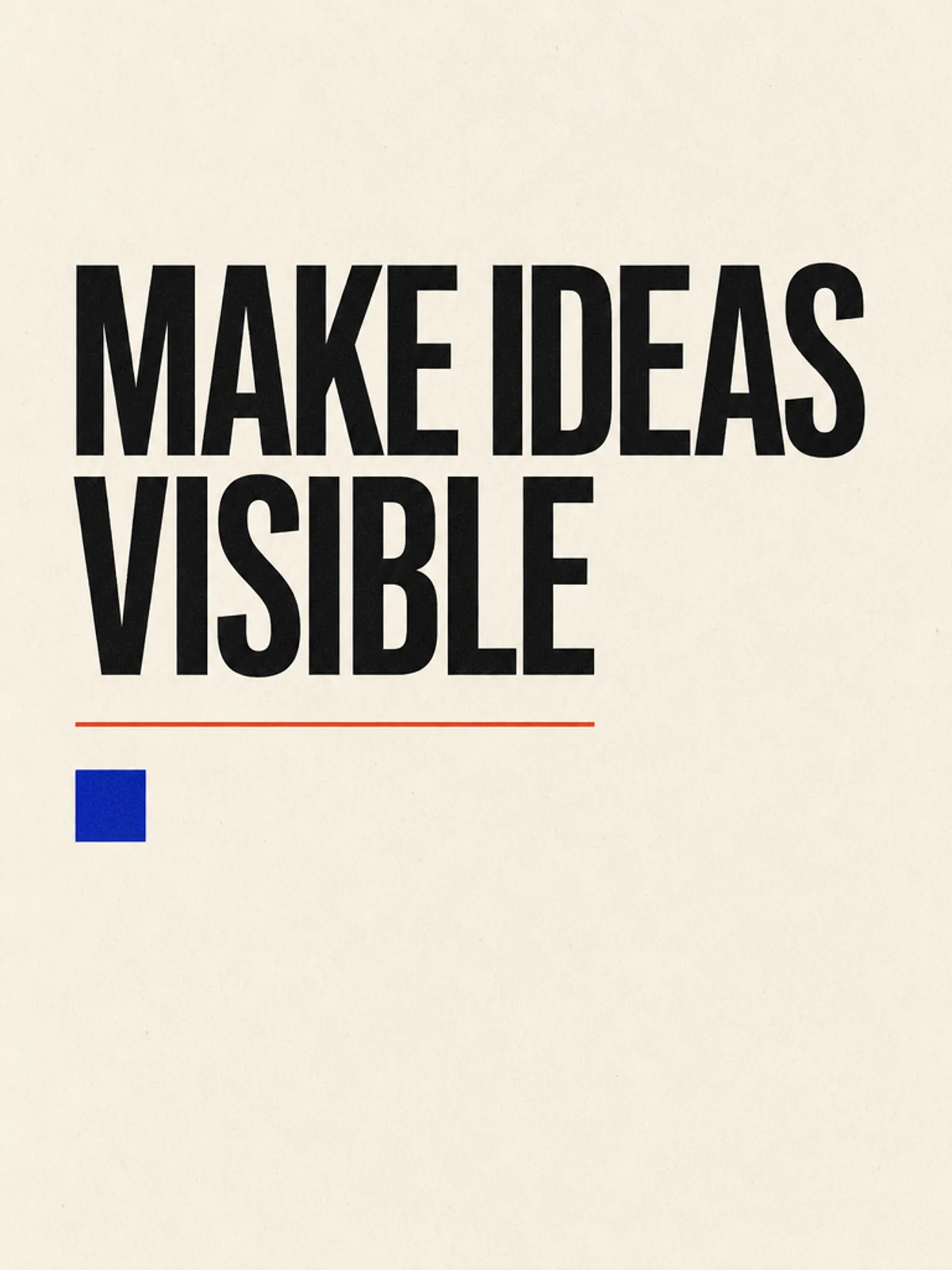
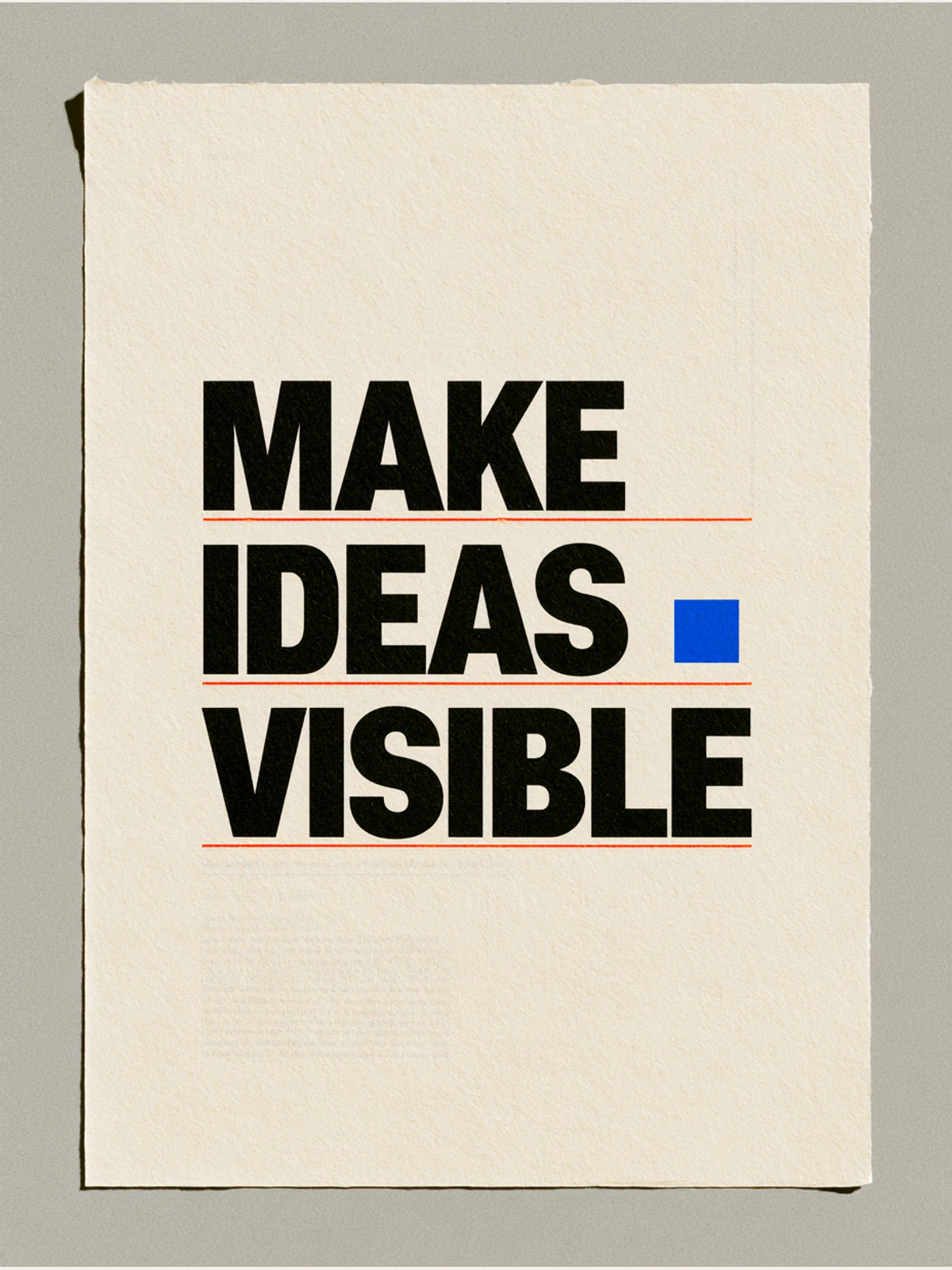
GPT Image won this case. Nano Banana Pro spelled and grouped the headline correctly, but the cobalt square ran into the edge rather than keeping the requested margin. Midjourney retained the words and order, yet turned the required two-line headline into three lines—MAKE, IDEAS, VISIBLE—and added more red rules plus a physical-paper mockup.
Test 2: oversized words with a strict left edge
This was deliberately easy on spelling and harder on spatial discipline: two common words, a prescribed line break, a left edge, wide margins and only one orange circle.
Create a vertical 3:4 typographic poster with exactly "MAKE" on the first line and "ROOM" on the second line. Use oversized condensed black sans-serif letters on pale gray paper, one small safety-orange circle in the lower-right corner, a strict left edge, wide margins, and subtle screen-print texture. The two quoted words must be the only readable text, with exact spelling and capitalization. No logo, signature, date, border, extra glyphs, or photographic objects.
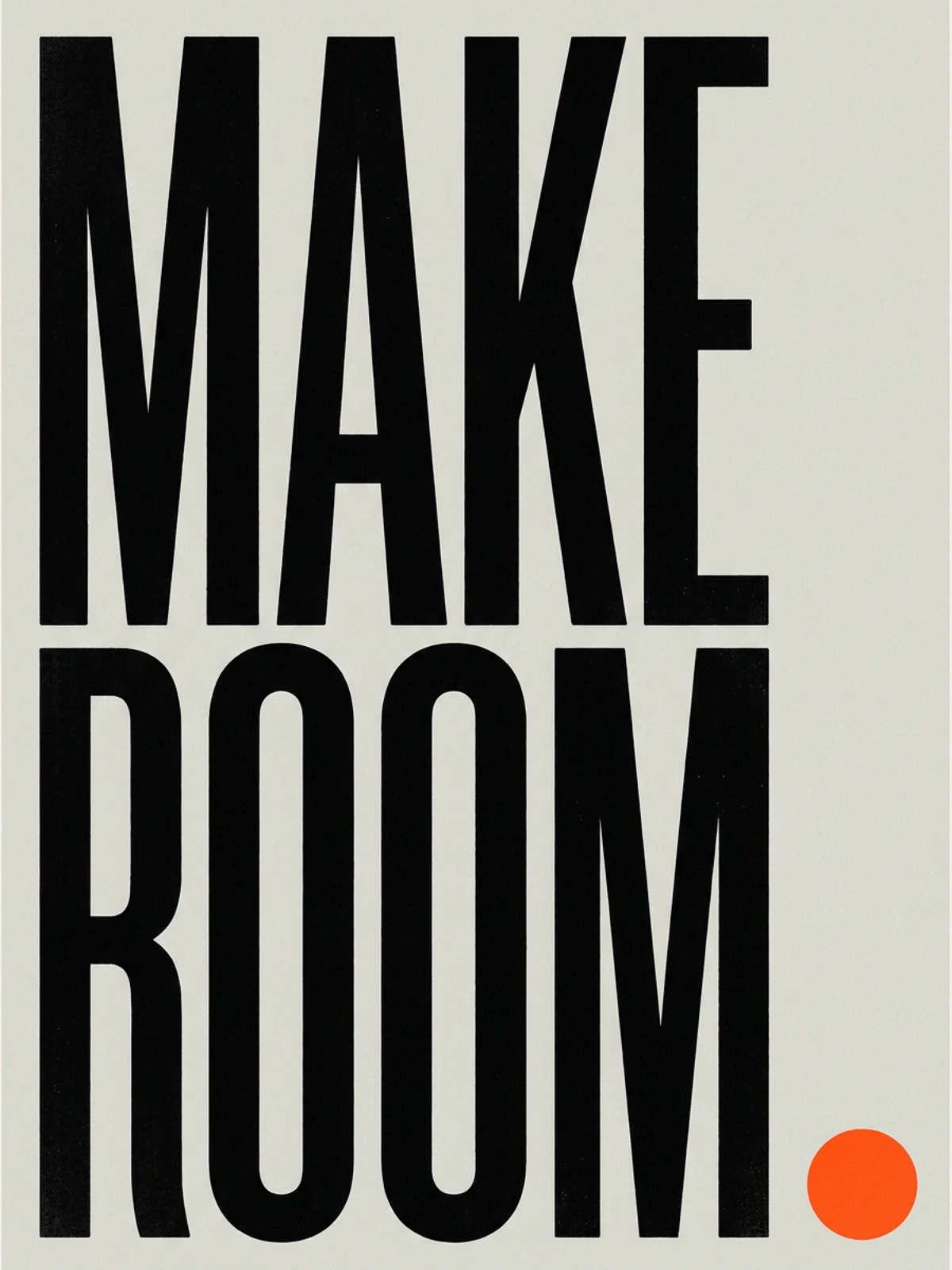
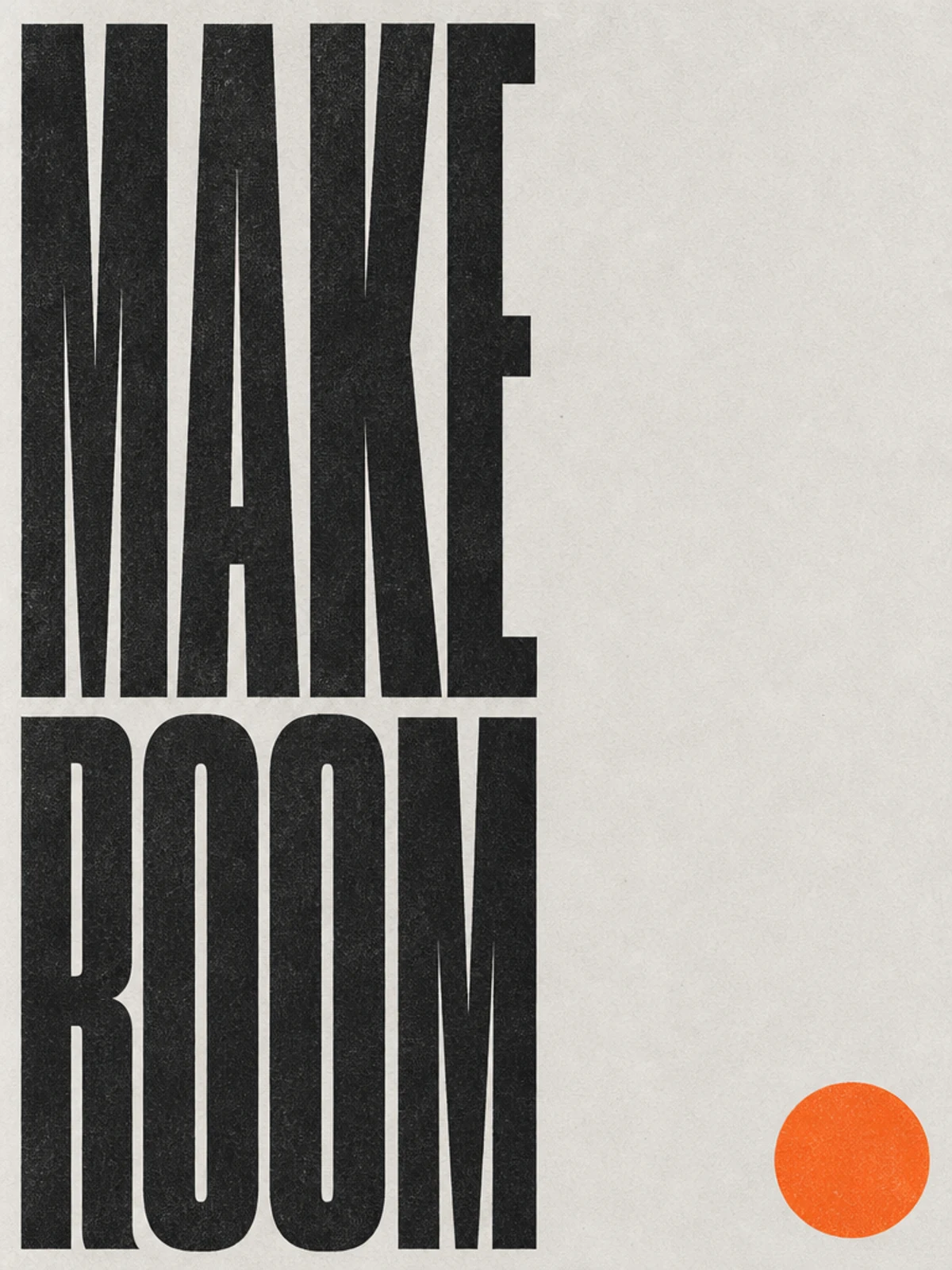
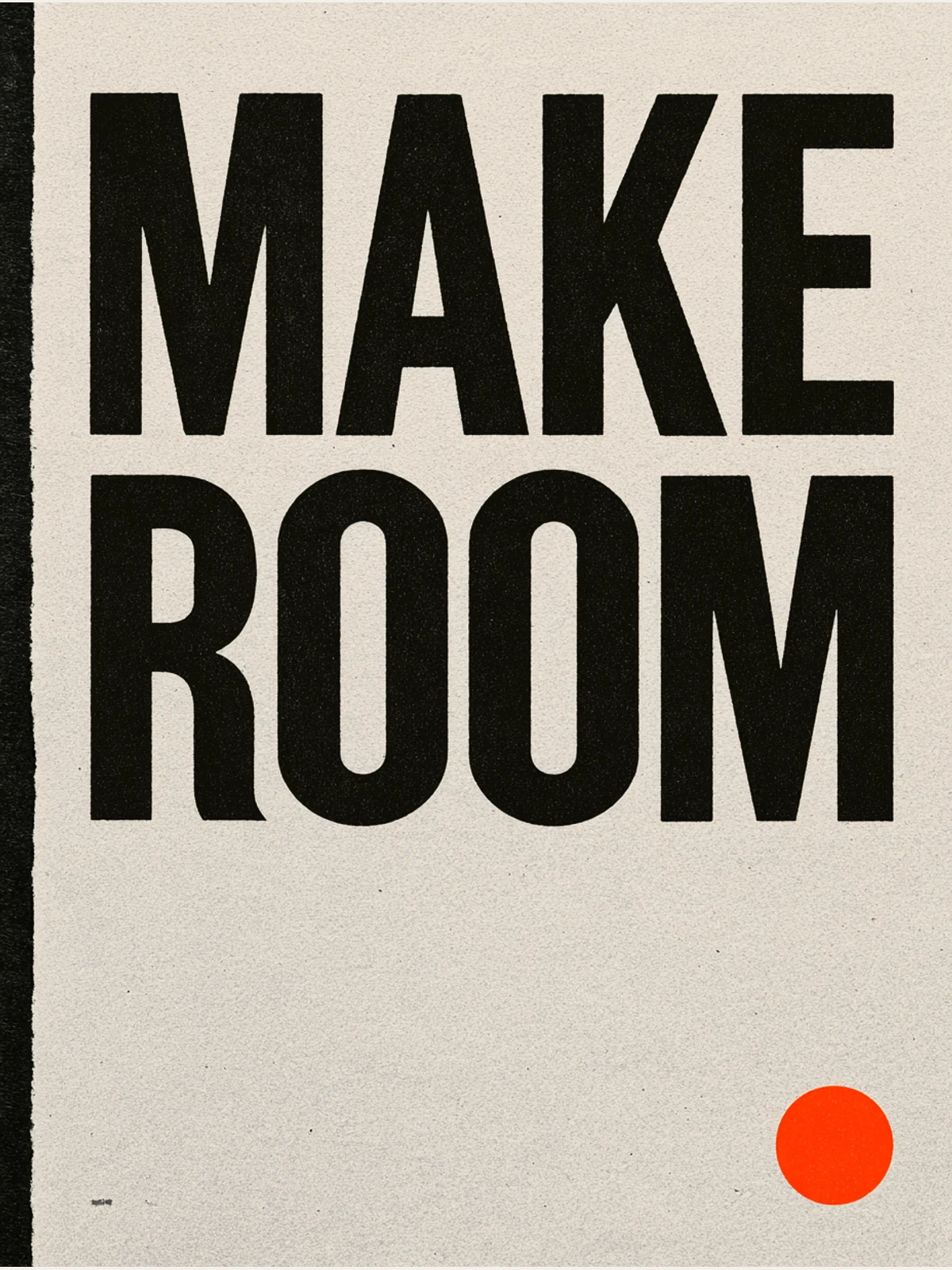
Nano Banana Pro and GPT Image tied here. Their compositions differ, but both kept the only non-negotiable structure: MAKE over ROOM, with no extra readable copy. Midjourney also passed the text and line-break check; the partial result came from an unrequested dark edge that reads like a physical sheet or border.
Test 3: numerals, punctuation and one-line lock
Numerals and punctuation are where “almost right” becomes unusable. A shop sign that reads 24/1, or pushes half the opening-hours message onto a second line, is not production-ready even if it looks stylish.
Create a vertical 3:4 wayfinding-style poster whose only readable text is exactly "OPEN 24/7" on one line. Use crisp navy-blue geometric sans-serif lettering centered on a lemon-yellow field, with a thin white rectangular keyline and generous empty space. Preserve the slash and every numeral exactly. No logo, icon, business name, secondary copy, date, signature, texture that obscures the letters, or additional marks.
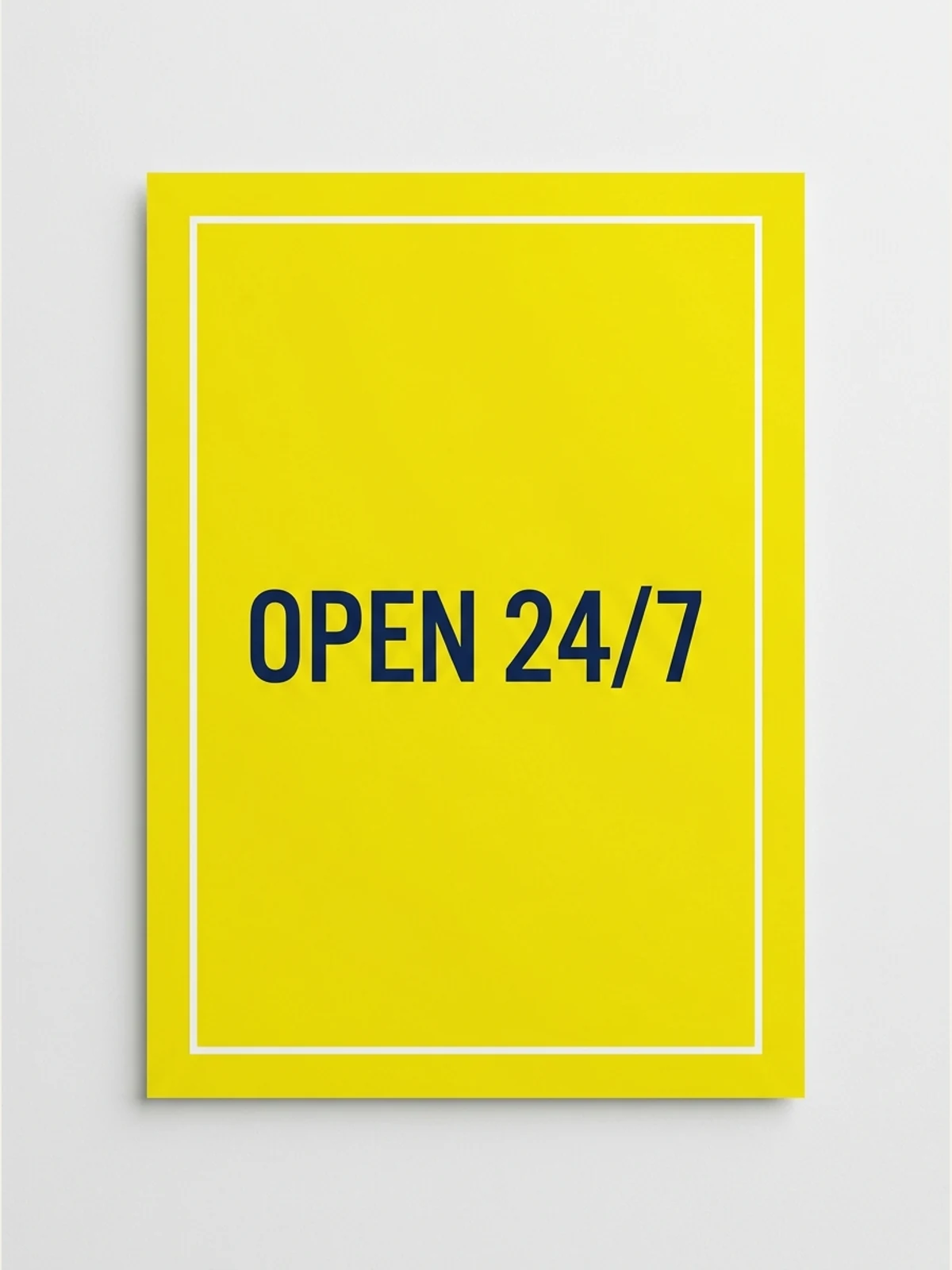
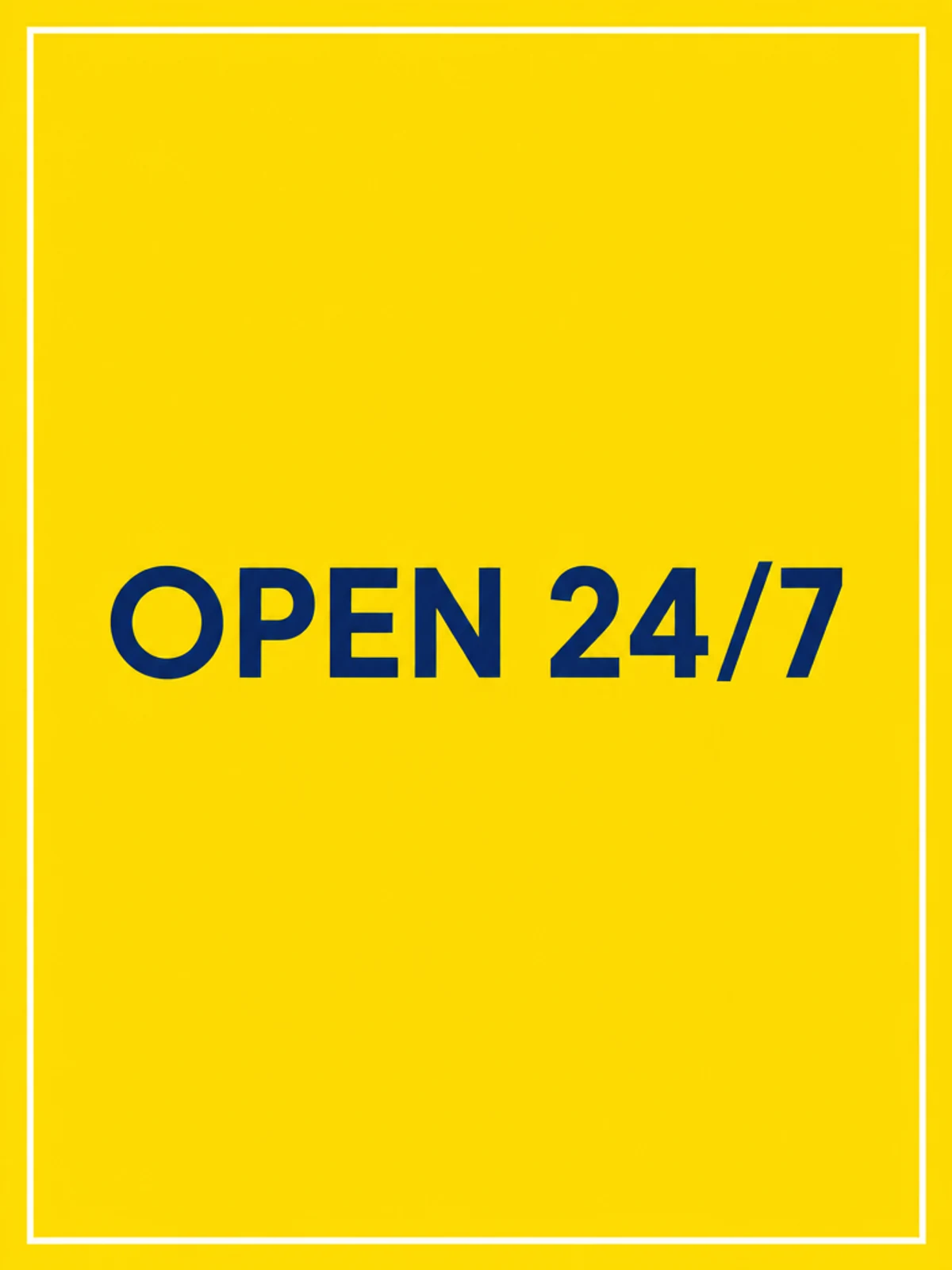
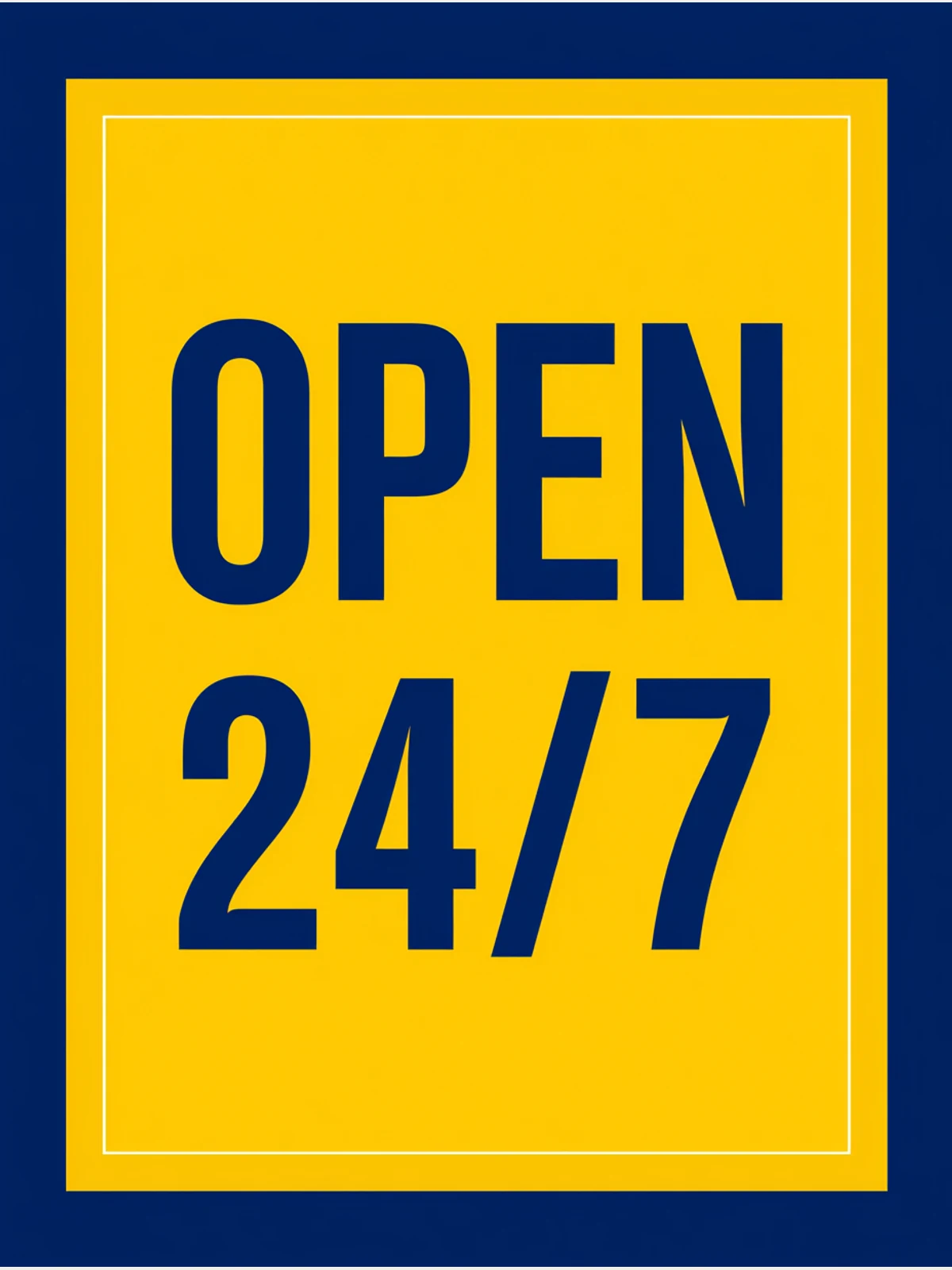
GPT Image won the clearest head-to-head in the set. It kept OPEN 24/7 on one line, centred it on the yellow field and stopped there. Nano Banana Pro preserved the exact string but interpreted “poster” as a photographed card. Midjourney preserved 24/7 exactly—including the slash—while breaking the explicit one-line lock and adding a navy surround.
Test 4: two periods and one semantic line break
The final brief checks whether a model treats punctuation and line grouping as content. The period after each sentence matters, and so does keeping each complete thought on one line.
Create a vertical 3:4 editorial poster with exactly "LESS NOISE." on the first line and "MORE SIGNAL." on the second line. Preserve both periods, spelling, capitalization, word order, and line break. Use a deep ink-blue background, warm-white serif lettering, a single thin mint-green waveform crossing the lower third without touching the words, and restrained paper grain. The quoted sentence must be the only readable text. No logo, signature, extra letters, labels, numbers, or mockup frame.
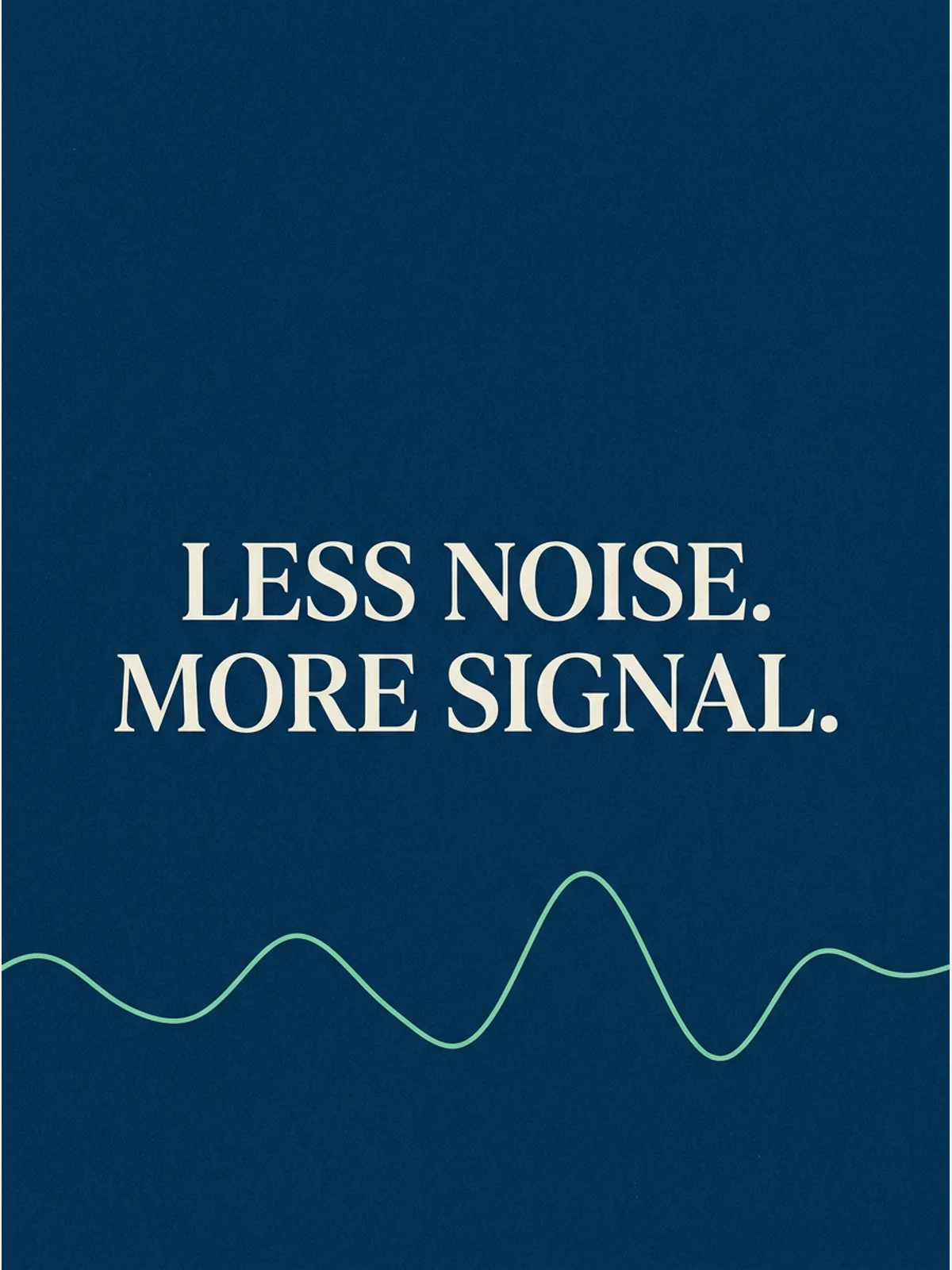
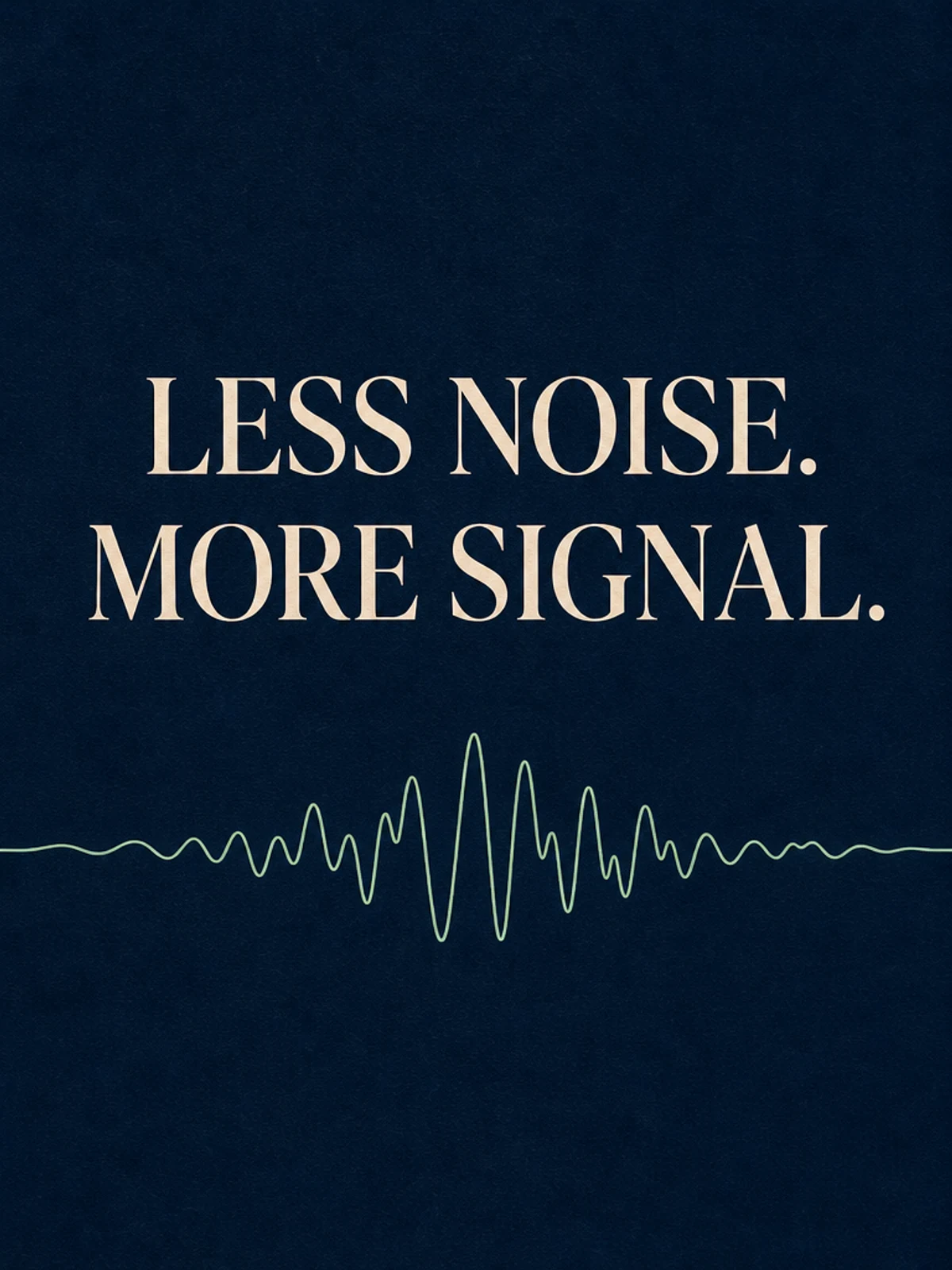
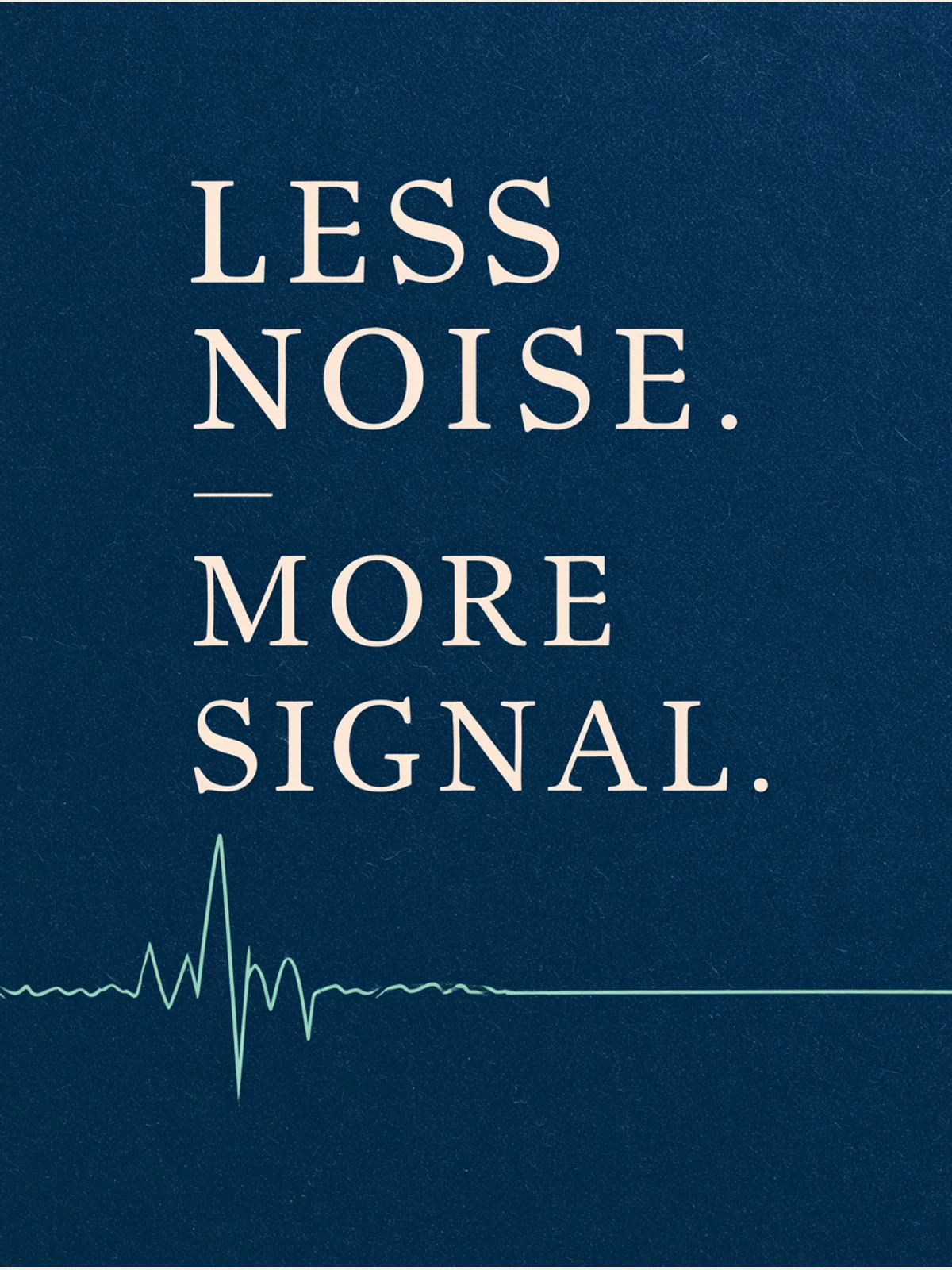
Nano Banana Pro and GPT Image tied. Both held the complete sentences, punctuation and two-line hierarchy. Midjourney kept every requested character but split the words into four lines and inserted a short decorative rule between the two thoughts.
Verbatim transcription and pass or partial result
↵ below records an actual visual line break; it is not a glyph generated in the image. “Pass” means both the requested text and line grouping survived. “Partial” states the visible departure rather than hiding it inside a single score.
| Brief | Model | Verbatim visible text | Result |
|---|---|---|---|
| Two-line phrase | Nano Banana Pro | MAKE IDEAS ↵ VISIBLE | Pass text and break; partial margin fidelity |
| Two-line phrase | GPT Image | MAKE IDEAS ↵ VISIBLE | Pass; case winner |
| Two-line phrase | Midjourney V8.2 | MAKE ↵ IDEAS ↵ VISIBLE | Partial; requested phrase split across three lines |
| Oversized stack | Nano Banana Pro | MAKE ↵ ROOM | Pass; joint strongest result |
| Oversized stack | GPT Image | MAKE ↵ ROOM | Pass; joint strongest result |
| Oversized stack | Midjourney V8.2 | MAKE ↵ ROOM | Pass text and break; partial because of added edge |
| Numerals and slash | Nano Banana Pro | OPEN 24/7 | Pass text and break; partial because of physical-card treatment |
| Numerals and slash | GPT Image | OPEN 24/7 | Pass; case winner |
| Numerals and slash | Midjourney V8.2 | OPEN ↵ 24/7 | Partial; one requested line became two |
| Two punctuated sentences | Nano Banana Pro | LESS NOISE. ↵ MORE SIGNAL. | Pass; joint strongest result |
| Two punctuated sentences | GPT Image | LESS NOISE. ↵ MORE SIGNAL. | Pass; joint strongest result |
| Two punctuated sentences | Midjourney V8.2 | LESS ↵ NOISE. ↵ MORE ↵ SIGNAL. | Partial; two requested lines became four |
What the results actually teach about prompting
All four prompts share the same useful skeleton:
- Put the required copy in quotation marks.
- Say exactly and name spelling, capitalization, punctuation and word order.
- Assign the line breaks in plain language—do not assume a slash means a new line.
- Say that the quoted copy must be the only readable text.
- Name a small number of layout elements, then explicitly forbid the usual extras.
That is why this test is more useful than “make a cool poster that says…”. The words are treated as immutable content, while colour, type class and supporting geometry remain art direction. The same hierarchy appears in our complete prompt-engineering guide and structured prompt templates.
Make a cool modern poster that says OPEN 24/7, bold typography, professional design
Set exactly OPEN 24/7 on one line. Preserve every numeral and the slash. This must be the only readable text. Centre it in navy geometric sans-serif type on a full lemon-yellow field with one thin white keyline. No logo, icon, business name, date, signature, mockup or additional mark.
Here is a reusable base template:
Create a [RATIO] [ASSET TYPE]. Set exactly "[COPY]" on [ONE LINE / LINE ONE]
and "[COPY]" on [LINE TWO]. Preserve spelling, capitalization, punctuation,
word order and the specified line breaks. The quoted copy must be the only
readable text.

TYPE: [FONT CLASS, WEIGHT, CASE, COLOUR]
FIELD: [BACKGROUND COLOUR / MATERIAL]
LAYOUT: [ALIGNMENT, MARGINS, POSITION, HIERARCHY]
SUPPORTING ELEMENTS: [ONE OR TWO SHAPES, COLOURS, POSITIONS]

Do not add a logo, signature, date, border, mockup, extra glyph, secondary copy
or brand mark.
For thumbnails, pair this copy lock with a composition that survives small sizes; the AI YouTube thumbnail guide shows how. If the words must remain editable, generate the image and negative space first, then typeset the final copy in a design tool. AI-rendered lettering is still pixels—not a substitute for a source file, font license, accessibility layer or legal proofread.
Real gallery examples to study
The controlled images above are deliberately simple. These published gallery entries show harder text-forward compositions. They are not matched tests and should not be read as additional benchmark wins; open each card to inspect the full prompt and model badge.

A 16:9 thumbnail with a verbatim stacked headline, presenter crop and flat colour field.
View promptHide prompt
A clean modern YouTube thumbnail on a bright white background, split visually between bold text on the left and a cropped presenter on the right. On the left, place a massive stacked headline in heavy black sans-serif uppercase reading CLAUDE DESIGN, aligned top-left across two lines. Below it, add a large rounded rectangular orange banner with a subtle drop shadow containing bold white uppercase text with an orange outline that reads IN 6 MINS. Near the headline, include 2 orange starburst spark shapes, one small beside the text and one much larger in the far right background. In the lower-left quadrant, show a floating app interface mockup for a design tool dashboard with a soft off-white panel, thin borders, rounded corners, and a faint shadow. The interface should have a left sidebar with 4 menu items labeled exactly: "Recent", "Your designs", "Examples", and "Design systems". The main panel header should say "Recent" and contain 3 project cards arranged in a grid, labeled exactly: "Thumio Design System", "Thumio Startup", and "Design System". On the right half, show a cropped photorealistic young adult man from chest up wearing a white turtleneck sweater, with messy light brown hair and light facial hair, positioned close to camera. His face is intentionally obscured by a solid tan rectangle placeholder covering most of the face area. He points with one hand toward the interface panel on the left, finger extended. Use a warm orange and white brand palette, high contrast, minimal clutter, polished creator-economy thumbnail styling, subtle shadows, and a composition designed for tech tutorial content.

A hero object with labelled information arranged around it—the reading order is part of the prompt.
View promptHide prompt
Ultra-clean modern (Food Name) infographic in a premium editorial style. Show the finished as the hero—freshly baked, sliced, plated, slightly floating in an angled three-quarter perspective with soft natural studio lighting and subtle drop shadow. Use a dynamic, non-linear layout where ingredients, steps, and info flow around the burger, not top-down.
Ingredients section: clean vector icons or mini illustrations with names and quantities, arranged in clusters or circular flows, visually connected to the dish.
Steps section: numbered panels with arrows or lines forming a logical path, including small cooking icons (knife, bowl, oven, timer). Use soft gradients or light Glassmorphism panels.
Optional info: calories, prep time, cook time, servings, spice level shown as minimal badges or bubbles near the dish.
Style blends lifestyle food photography with editorial infographic design—vibrant natural colors, modern sans-serif typography, clean hierarchy, ample negative space. Minimal textured or gradient background. Output 1080×1080, ultra-crisp, social-feed optimized, no watermark.

An exploded layout whose labelled elements are assigned a fixed clockwise position.
View promptHide prompt
Ultra-realistic family fashion infographic photography featuring a Father, Mother, and Daughter in coordinated casual outfits, arranged in a balanced circular exploded composition.
Floating elements organized clockwise around the trio:
• Father: neutral baseball cap, classic wristwatch, cotton crew-neck tee, lightweight casual jacket, tailored denim jeans, leather belt, ankle socks, white sneakers.
• Mother: soft knit hat, minimal gold earrings, relaxed-fit cotton top, cropped denim or linen jacket, high-waist jeans, leather belt, clean sneakers, structured mini handbag.
• Daughter: playful hair accessories, soft cotton tee, light denim jacket, stretch jeans, ankle socks, pastel sneakers, mini backpack.
Each clothing item suspended mid-air with fine dotted guide lines connecting back to each family member.
Minimal editorial labels highlighting fabric, color, and material details (cotton, denim, leather, rubber sole).
Clean studio background with subtle gradient.
Soft diffused lighting for a warm, wholesome mood.
Premium lifestyle editorial styling, ultra-sharp focus, natural skin tones, 8K quality, high-end fashion catalog aesthetic.


You can also browse the GPT Image prompt hub, Nano Banana prompt hub and Midjourney prompt hub, or run the four prompts unchanged in the LocalBanana generator.
Which model should you start with?
For a short English poster whose line breaks matter, start with GPT Image in this test's conditions. It combined exact copy with the fewest unrequested presentation decisions. Nano Banana Pro also kept the required characters and line grouping in these four outputs, making it another candidate to test on your actual brief. Midjourney V8.2 is viable when visual interpretation matters more than a locked typesetting grid; in this run it spelled the short copy correctly but repeatedly treated line breaks as suggestions.
This conclusion is limited to the twelve displayed outputs. Nano Banana vs GPT Image and Nano Banana vs Midjourney explain how to choose a task and compare workflows without inferring performance from gallery examples.
For a real campaign, set a repeat count in advance and test the final copy with your two candidates, proofread at 100% zoom, then rebuild mission-critical words as editable type. A model can win a test and still miss the one slash your storefront depends on.
FAQ
Which AI image generator rendered text best in this test?
GPT Image matched the full brief most closely in two of these four cases, with no clear overall preference over Nano Banana Pro in the other two. Both kept the requested characters and line grouping in their displayed outputs; the differences were in margins, added elements and presentation. This is a judgment about these files, not a reliability score.
Did Midjourney V8.2 misspell the words?
No requested letter, numeral or period disappeared in the four displayed outputs, and it did not invent a readable brand, date or logo. Its main failure was structural: it changed the requested line breaks in three cases and added mockup or decorative elements. That is why “can render words” and “can typeset a locked layout” should be evaluated separately.
Are these results statistically conclusive?
No. This is one candidate per prompt and model on September 3, 2026. It is designed to expose visible failure modes and be reproducible, not estimate a stable success rate. Longer copy, other scripts, other settings and repeated runs may change the ordering.
How should I prompt exact text in an AI image?
Quote the copy, use the word “exactly,” name capitalization and punctuation, assign every line explicitly, say it must be the only readable text, and forbid secondary copy, logos, dates and signatures. Keep the rest of the layout brief enough that those hard constraints do not get buried.
Should I ship the generated words as the final design?
Only when the stakes are low and you have proofread the full-resolution image. For prices, instructions, accessibility-critical copy, regulated claims or reusable brand assets, generate the visual treatment and then typeset the words in an editable design tool.